The Hidden Time Sink in Modern Workplaces: The Cost of Slide Hunting

In today’s fast-paced business environment, even the smallest inefficiencies can add up to substantial losses. One often-overlooked drain on productivity is slide hunting, the time employees spend searching for the right presentation slide among countless files, emails, and folders. This comprehensive analysis delves into the monetary and operational impact of slide hunting, supported by recent studies and industry insights, while subtly positioning a solution designed to streamline this process. For professionals and decision-makers, this discussion not only highlights the hidden costs but also offers actionable strategies for reclaiming lost time and improving overall productivity.
Quantifying the cost: time lost equals money lost
The daily drain: beyond a simple statistic
Recent research has revealed a stark reality about workplace inefficiencies:
- Two Hours a Day: According to an HCAMag article, employees waste at least two hours each day just searching for necessary resources. This statistic reflects more than lost minutes, it represents a significant reduction in the time available for high-impact work.
- Decentralized Information: An analysis by Xenit shows that fragmented digital storage forces employees into a continuous cycle of retrieval, further compounding the time lost. When content is dispersed across local drives, cloud platforms, and emails, the resulting inefficiencies can derail even the best-laid work plans.
Putting a price tag on lost productivity
Let’s break down the numbers for a clearer picture:
- Hourly Cost Assumption:
We assume an average employee hourly wage of $100. This figure reflects the high opportunity cost associated with top-tier professional and executive time in competitive markets.` - Daily Loss Calculation:
- Time Wasted per Day: 2 hours
- Daily Cost: 2 hours × $100/hour = $200 lost per employee each day.
- Time Wasted per Day: 2 hours
- Annual Impact per Employee:
With approximately 250 working days per year:- Annual Loss: $200/day × 250 days = $50,000 lost per employee annually.
- Annual Loss: $200/day × 250 days = $50,000 lost per employee annually.
- Team and Organizational Impact:
For a team of 10 employees, the cumulative annual loss can reach:- $50,000 × 10 = $500,000 per year.
When these inefficiencies are scaled across larger organizations, the losses grow exponentially, directly affecting the bottom line and limiting strategic investments.
- $50,000 × 10 = $500,000 per year.
Additional insights from the reports reveal that a substantial portion of time spent on PowerPoint tasks is consumed by the search and assembly of slides. This not only slows down the creation of presentations but also introduces errors that further delay decision-making and client communications.
Slide hunting: A critical and often overlooked subset
While general research on information search highlights significant lost time, a notable fraction of these inefficiencies specifically pertains to slide hunting. Professionals engaged in presentation creation often experience:
- Digging Through Multiple Systems:
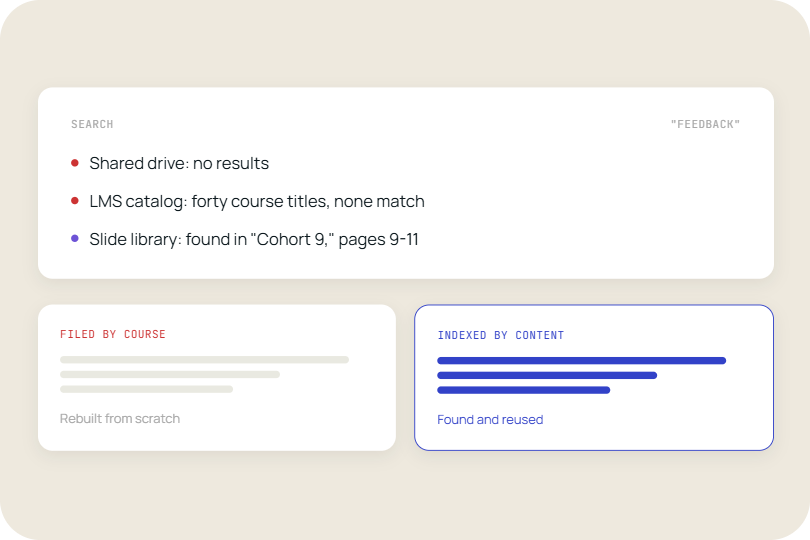
Instead of a single, unified source, employees must sift through disparate systems (local drives, cloud storage, and outdated email threads) to locate the right slide. This search process is not only time-consuming but also disrupts the creative flow necessary for impactful presentations. - Experiencing Delays:
The search for a missing slide can cause critical delays in meeting preparation. Such delays not only postpone project delivery but also undermine the momentum needed for strategic discussions and client engagements. According to the EmpowerSuite study, the cumulative effect of these delays contributes heavily to overall productivity losses. - Compromised Quality and Consistency:
In the rush to retrieve slides, employees may inadvertently use outdated or inconsistent content, leading to presentations that are misaligned with corporate branding and messaging. This inconsistency not only tarnishes the organization’s image but can also result in missed business opportunities.
Why slide hunting persists: root causes of the inefficiency
Several factors continue to exacerbate the problem of slide hunting:
- Fragmented Storage Systems:
Presentation assets are often stored in multiple locations (local computers, shared drives, cloud services, and email attachments) making it difficult to locate the right file quickly. This lack of integration creates silos of information that impede swift retrieval. - Lack of Centralized Management:
Without a unified system, maintaining the latest, approved versions of slides becomes a challenge. Employees frequently encounter version confusion, leading to redundant searches and potential errors in the final presentation. - Manual Processes:
Relying on manual organization and search methods not only increases the time required to locate content but also raises the risk of human error. The absence of automation further burdens employees, diverting attention from strategic tasks. - Cultural and Operational Inertia:
Many organizations continue to rely on outdated workflows and legacy systems. The resistance to change, combined with inadequate investment in digital tools, perpetuates the cycle of inefficiency.
Each of these factors compounds the problem, creating a persistent cycle that drains productivity and inflates operational costs while simultaneously contributing to employee frustration and decreased morale.
Bridging the gap: A strategic approach to slide management
To address the inefficiencies of slide hunting, organizations must adopt a comprehensive approach to presentation management. By centralizing and automating slide management processes, companies can reclaim lost time and convert inefficiencies into strategic advantages. Consider the following strategies:
- Centralized Slide Libraries:
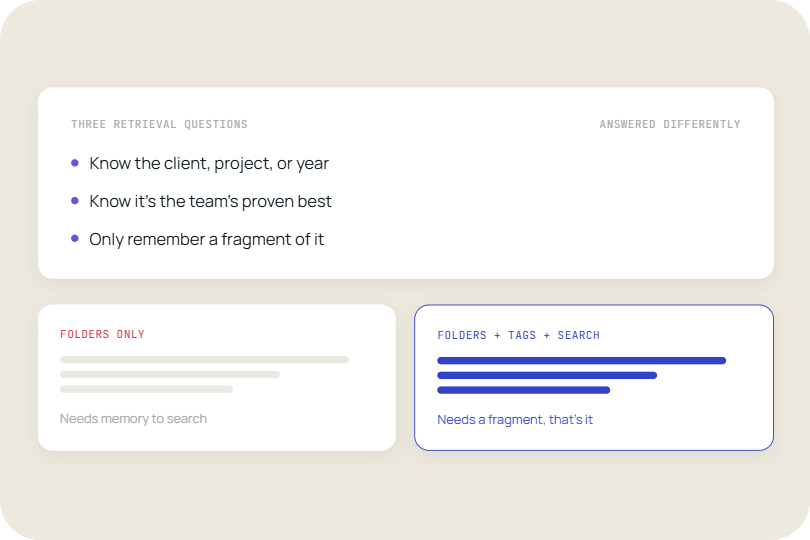
Establish a single, unified repository where all presentation assets are stored. This not only simplifies access but also ensures that employees always have the most up-to-date, approved content at their fingertips. Centralized libraries can be further enhanced with metadata tagging and categorization, making searches more intuitive. - Advanced Search Capabilities:
Leverage artificial intelligence (AI) and machine learning to integrate intelligent search functions within the repository. Advanced search tools can quickly identify and retrieve the right slide based on keywords, previous usage patterns, or even visual cues dramatically reducing search times. - Unified Presentation Management Platforms:
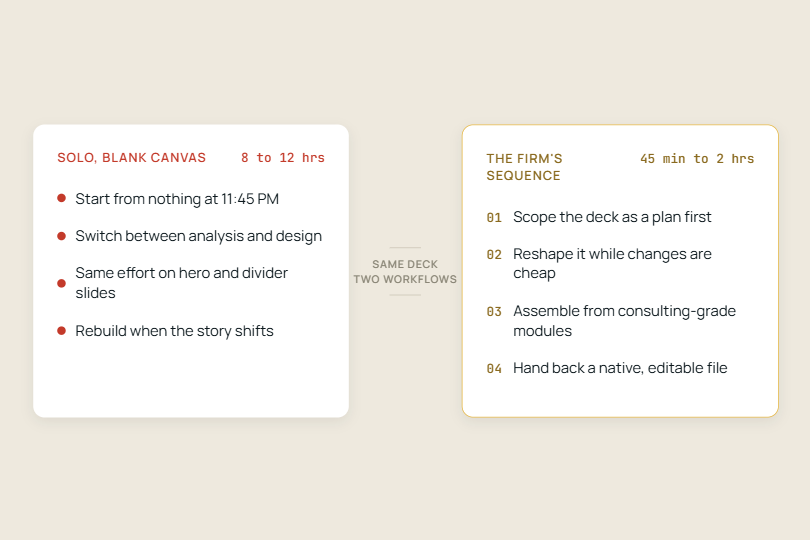
Adopt systems that combine slide search, file browsing, template management, version control, and an AI assistant into one integrated solution. These platforms not only reduce the time wasted on slide hunting but also enhance overall presentation quality by ensuring consistency and compliance with corporate branding. - Workflow Automation:
Implement automation tools to streamline repetitive tasks, such as formatting, version tracking, and content updates. Automation can significantly reduce the manual workload, allowing employees to focus on high-impact, creative tasks rather than administrative hassles. - Change Management and Training:
For successful adoption of new technologies, organizations must invest in change management programs. Training sessions and user support initiatives can ensure that employees are comfortable with the new systems, maximizing the return on investment and fostering a culture of continuous improvement.
A closer look at an integrated solution: empowering teams with TeamSlide
For companies ready to transform their slide management practices, platforms like TeamSlide offer an all-in-one solution that addresses the root causes of slide hunting. Here’s how TeamSlide empowers organizations:
- Slide Search:
Quickly locate any slide within your centralized repository. Advanced search algorithms enable users to find exactly what they need without sifting through countless files. - PowerPoint Presentation Management:
Seamlessly integrate with PowerPoint to streamline the creation, editing, and updating of presentations. This integration ensures that teams can work more efficiently and maintain consistent branding. - Template Management & File Browsing:
Utilize standardized templates to guarantee consistency and reduce the time spent on formatting. Robust file browsing features help organize content logically, making it easier for teams to navigate and retrieve necessary materials. - Version Control:
Ensure that employees always have access to the most current and approved versions of slides. Version control minimizes the risk of errors and avoids the confusion caused by outdated information. - AI Assistant:
Leverage intelligent recommendations and automated content curation to further reduce the time spent on assembling presentations. The AI assistant continuously learns from user behavior to enhance search precision and suggest relevant content.
By addressing the root causes of slide hunting, solutions like TeamSlide not only reclaim lost time but also empower teams to focus on strategic initiatives that drive business growth and innovation.
Additional insights and future trends
The broader implications of digital disorganization
The challenges of slide hunting are symptomatic of a larger issue: digital disorganization. When critical assets are mismanaged, the repercussions extend beyond mere time loss:
- Reduced Innovation:
Constant interruptions and inefficient workflows hinder creative thinking, preventing teams from dedicating time to innovation and strategic planning. - Employee Burnout:
Persistent frustration caused by inefficient processes can contribute to burnout, lowering employee morale and increasing turnover rates. - Missed Business Opportunities:
Delays in presentation preparation may result in missed deadlines and lost opportunities, directly affecting an organization’s competitive edge.
Future trends in presentation management
As technology continues to evolve, several trends are poised to revolutionize the way organizations handle digital content:
- Increased Adoption of AI:
The integration of AI in search and content management systems is set to become the norm, offering unprecedented levels of efficiency and personalization. - Cloud-Based Collaboration:
Cloud platforms that support real-time collaboration will further streamline workflows, allowing teams to work together seamlessly across geographic boundaries. - Data-Driven Insights:
Analytics tools that track usage patterns and search behaviors can provide valuable insights, helping organizations continuously refine their processes for optimal performance.
Conclusion: from hidden cost to strategic advantage
The time lost in slide hunting represents far more than a minor inconvenience, it’s a hidden cost that, when scaled across an organization, translates into substantial financial losses and missed opportunities. As evidenced by studies from HCAMag and Xenit employees waste critical hours each day that could otherwise be dedicated to high-impact work.
For forward-thinking organizations, the solution lies in adopting a centralized, intelligent approach to slide management. By integrating advanced search capabilities, centralized libraries, and automated workflows, companies can transform wasted time into strategic advantage empowering employees, enhancing productivity, and ultimately boosting the bottom line.



More from our blog
Discover insights and strategies for better presentations