How Independent Consultants Can Create Client-Ready PowerPoint Presentations Faster
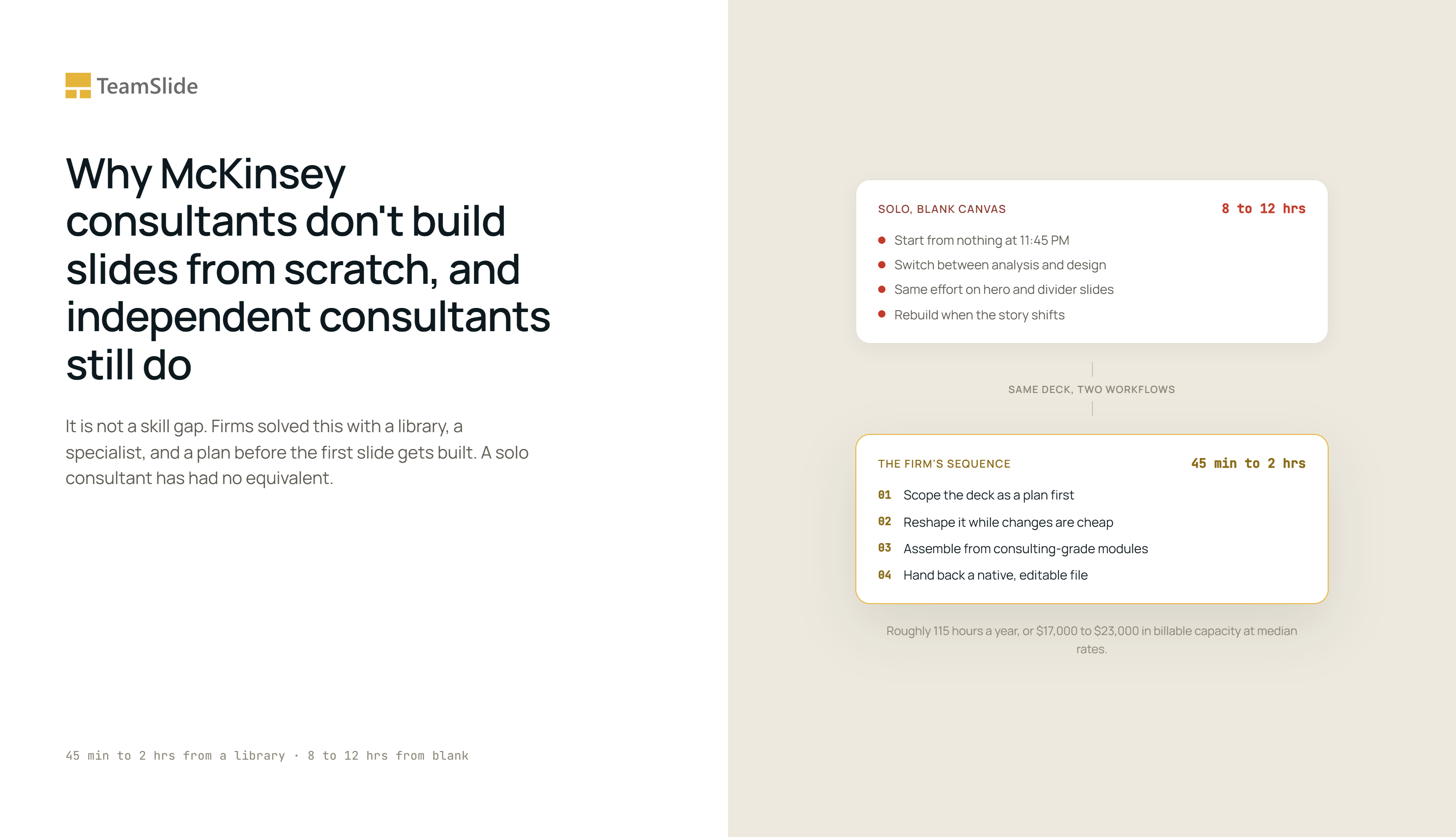
It's 11:45 PM. Your recommendation is done. You've spent the last 90 minutes nudging text boxes, fixing chart labels, and aligning a title slide for tomorrow's client meeting.
None of that time went into the argument. It went into building the slide by hand, from a blank canvas, because there was nothing to start from.
If you're an independent consultant, this isn't a one-off bad night. It's a recurring cost that never shows up on an invoice, because you can't bill a client for building your own slides from scratch. Every hour spent on it is an hour you can't sell, and it happens on a loop: new engagement, new deck, same fight with the same software.
Firms figured out how to avoid this years ago. Independent consultants mostly haven't, not because they're worse at PowerPoint, but because they never had access to the workflow firms built to solve it.
Why this problem doesn't exist at McKinsey or BCG
A first-year associate at a top firm isn't starting from a blank canvas at midnight. They're working inside a system with three parts: a curated library of pre-approved slide layouts, a visual identity team enforcing brand consistency, and a presentation specialist whose job is to turn the associate's rough notes into a finished visual.
That system does something specific. The associate sketches the argument and hands it off. A specialist scopes what the deck needs, builds it from an existing library rather than from nothing, and hands back something editable. The associate stays on the analysis the whole time.
Independent consultants have none of that. No design team. No presentation specialist. No library of approved layouts. Just PowerPoint, a blank canvas, and whatever time is left after the actual analysis is done.
That's not a skill gap. It's a workflow gap. Firms solved it with people and process. Solo consultants have had no equivalent, until AI-native workflows made it possible to give one person the same structural advantage a firm gives a whole team.
It's not a formatting problem, it's an assembly problem
Here's the reframe worth sitting with: consultants shouldn't be designing slides at all. They should be assembling arguments, and the deck should be assembled for them.
Design in the traditional sense, spacing, alignment, color, iconography, is a skill most consultants were never trained in and shouldn't need to be. What they're actually good at is structuring an argument: knowing which insight matters, which data supports it, and how to sequence a story a client will act on. Formatting has nothing to do with that skill. It's the toll you pay before the argument reaches the client.
Not every slide charges the same toll. A quick way to see this in your own decks:
Hero slides. The 2 to 4 slides carrying your actual recommendation. These deserve real attention, because this is where the argument lives.
Supporting slides. Backup data and detailed analysis. These need to be accurate and legible, not beautiful. Over-designing them is pure time loss.
Connective slides. Agendas, dividers, next steps, title pages. Pure structure, zero argument. There's no reason any of these should take real thought, on any engagement, for any client.
Most consultants apply the same effort across all three because they build a deck in one continuous session, without separating what the slide should argue from what it should look like. That's the biggest source of wasted time, more than any individual PowerPoint skill gap.
There's a second cost hiding here: context switching. A firm associate hands a rough slide to a design team and moves back to analysis. A solo consultant does both jobs in the same sitting, often the same hour, paying the mental cost of switching between analytical thinking and visual production over and over inside a single deck. That cost doesn't show up in any time-tracking spreadsheet. It's real anyway.
What this actually costs
Venngage's presentation research found that presenters building from a template finish a deck in 45 minutes to 2 hours, while presenters starting from a blank canvas take 8 to 12 hours for the same result. That gap, 6 to 10 times slower, comes entirely from production, not thinking.
24Slides' study of nearly 1,000 professionals found an average of 4.87 hours a week spent on deck design. Client-facing consulting work tends to sit at or above that, given how frequently new decks get built.
Put a rate against it. Consultfees' 2026 benchmarks put the median independent consulting rate at $150 to $200 an hour, with specialists running $300 to $500. Even a conservative estimate, that half of weekly deck time is production overhead rather than argument-building, works out to roughly 115 hours a year. At median rates, that's $17,000 to $23,000 in billable capacity lost annually to a task that isn't advisory work at all. At specialist rates, it's $35,000 or more.
Run that across a single engagement and it's easier to feel. A six-week strategy project, one client, ending in a 30-slide readout, typically goes through several rounds of rebuilding as the analysis shifts: a new chart here, a reworked framework there, a title slide redone because the story changed. Three to four hours of pure rework across six weeks is a realistic estimate for a deck built without any structural head start. Multiply that across 6 to 10 engagements a year, and the individual-project rework alone adds another 20 to 40 hours on top of the routine weekly total above.
How consultants try to fix this today, and why it falls short
Most independent consultants try one of three things.
They reuse old decks, copying a slide from a past project and hoping the formatting survives the paste. It usually doesn't. Fonts shift, colors clash with the new client's palette, and you end up fixing more than you saved.
They build their own templates in PowerPoint. This helps, until the deck needs something the template didn't anticipate: a different chart type, an extra data point, a structure the template wasn't built for. A template is a single fixed layout you pour content into, and consulting work rarely stays inside the lines.
They try a generic AI presentation tool. Most of these are built for pitch decks and marketing slides, and they show it: rounded illustration-style graphics, decorative layouts, and output that reads as consumer-facing rather than client-ready. Worse, many hand you a flattened image instead of an editable slide, so the moment a client asks for a small change, you're rebuilding it in PowerPoint anyway, which defeats the entire point. And they generate in one shot, with no say in the structure before it's built, so when the output is wrong you start over instead of adjusting.
None of these three closes the gap. They reduce the pain slightly and reintroduce it somewhere else. The underlying issue isn't which shortcut you pick. It's that none of them replace what a firm's workflow actually does: scope the deck, build it from an existing library, and hand back something editable, without the consultant doing the visual work by hand.
What actually fixes this
Working faster in PowerPoint doesn't close a workflow gap. What closes it is giving one person the same sequence a firm gives a whole team: a plan first, control over that plan, assembly from a real library, and a native file at the end.
That sequence is the point, and it's worth being specific about, because it's what separates a consulting workflow from a generic slide generator.
It starts with a plan, not a finished deck. You enter your notes, and before anything is built, you get a proposed structure for the deck: what each slide argues and how the story sequences. This is the part a generic tool skips. It's also the part a firm's design team does first, scoping the deck before touching a layout. You review that plan and reshape it while changes are still cheap, before a single slide is produced.
Then it assembles from modules, not a fixed template. A template is one rigid layout. A module library is a set of consulting-grade building blocks, a market-sizing layout, a framework diagram, a roadmap, a financial summary, each carrying the conventions that kind of slide follows. The deck is built by combining the right modules for your argument, which is closer to how a firm's library works than to how a template works. You keep control here too: you can pin a specific layout or element you want and let the rest build around it, the same way you'd direct a specialist toward the structure you already have in mind.
Then it produces a native, editable PowerPoint file, not an image. When a partner or client wants one number changed, an editable slide is the difference between a two-minute fix and starting over.
That review-and-refine loop is the difference that matters. You're not pasting notes and hoping. You get a plan, you shape it, the slides get assembled from consulting-grade modules, and you get a real .pptx you can keep working in.
This is what TeamSlide's slide generation is built for, by people who did the consulting work and know the difference between a slide that looks good in a screenshot and a slide a client will act on. It doesn't just generate slides. It generates them the way consultants actually work: it builds a plan, lets you refine the structure, then assembles the deck from consulting-grade modules before producing a native PowerPoint file you can still edit.
If the 11:45 PM version of this problem sounds familiar, Sign up for early access.
Frequently asked questions
Why does building a slide deck take so long?
Most of the time isn't spent deciding what to say. It's spent on production: aligning text boxes, fixing chart formatting, and building each slide from a blank canvas, tasks that have nothing to do with the argument itself.
How do consultants at large firms make slides faster than independent consultants?
They don't do it alone, and they don't start from scratch. Firms provide pre-approved slide libraries, brand teams, and presentation specialists who scope the deck and build it from an existing library, so the associate's job is closer to assembling an argument than producing a visual.
What's the difference between an AI presentation generator and an AI consultant workflow?
A generic generator takes notes and produces a finished slide in one shot, usually optimized to look good once. A consultant workflow proposes a plan first, lets you refine the structure, assembles the deck from consulting-grade modules, and hands back native, editable PowerPoint you can keep working in.
Can I control the structure before the slides are generated?
In a workflow built for consultants, yes. You review the proposed plan before anything is built, reshape the sequence, and pin specific layouts or elements you want kept, so the output matches the argument you're making rather than a generic guess.
Why do editable slides matter more than good-looking ones?
Because clients ask for changes. A locked image means rebuilding the slide from scratch when one number moves. A native PowerPoint file means a two-minute edit.



More from our blog
Discover insights and strategies for better presentations