Slide Library vs Shared Drive: Why Teams Switch
Twenty percent. That's roughly how much of the average workweek McKinsey's own research attributes to employees simply looking for information that already exists somewhere in the company, not creating it, just finding it. For teams that live inside PowerPoint, that twenty percent has a very specific street address: the shared drive.
Every team runs into this the same way. Someone spends twenty minutes hunting for a chart they know exists, gives up, and rebuilds it from scratch. Nobody sits down one day and decides the shared drive has failed. It just gets slower, one folder at a time, until rebuilding a slide feels faster than looking for it, and somebody finally asks whether there's a better way to keep the team's actual working content.
This isn't really an argument for buying software. It's a question worth answering honestly first: what is the shared drive actually costing, and does the alternative solve that specific cost, or just move it somewhere else.
A shared drive was built to store files, not to answer questions
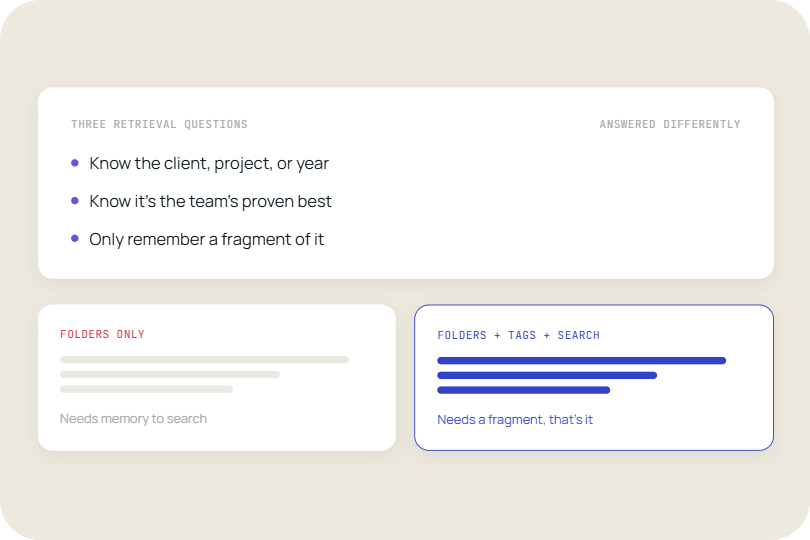
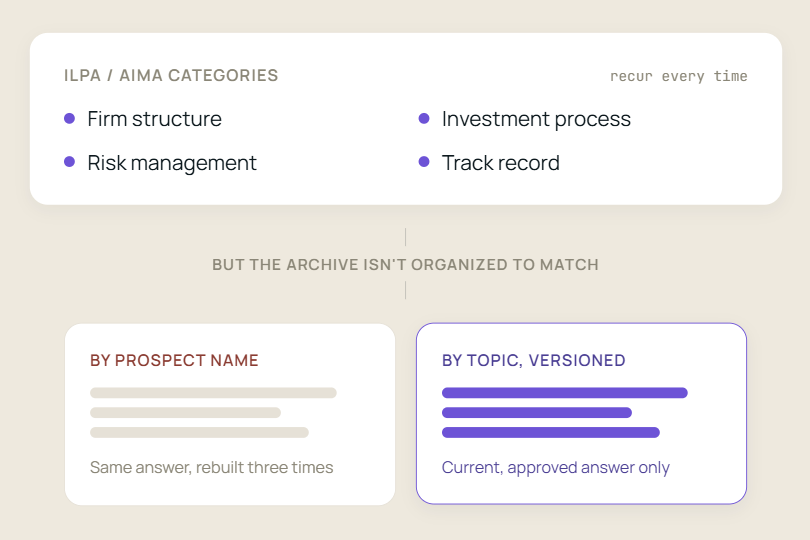
A shared drive organizes content the way whoever created the first folder happened to think about it that day. Finding something later means remembering that exact structure, or typing a file name close enough to what the original author chose. That holds up fine for a few months. It stops holding up once three or four people have been adding to the same drive for a couple of years, each with their own naming habits, their own sense of what counts as "final," and their own folder they were sure made sense at the time.
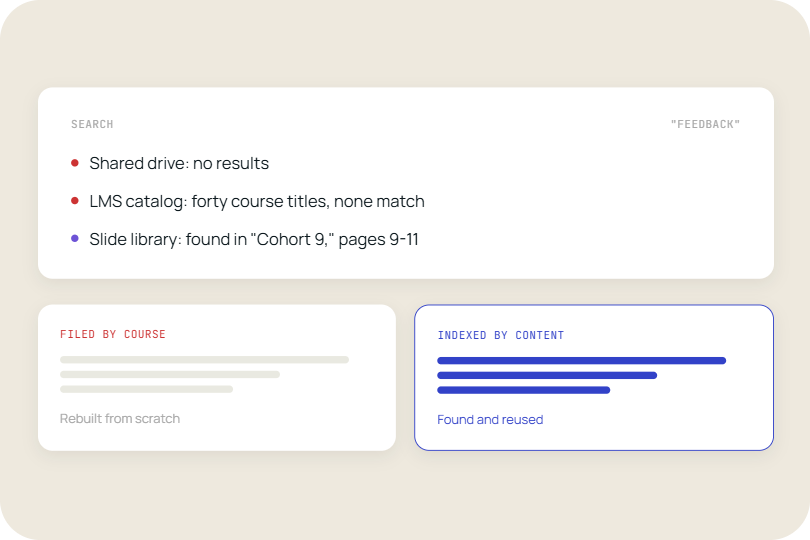
The deeper issue isn't the mess, it's what a shared drive can't do even when the mess is minimal: search inside a deck. Typing "Q3 revenue chart" into a file browser searches file names, not the actual content of the slides. Whatever chart is buried on slide 14 of a deck named "Client_Deck_FINAL_v3_reallyfinal.pptx" simply doesn't exist as far as the search bar is concerned.
A survey covered by KMWorld's reporting on enterprise presentation management found that roughly half of employees have trouble locating documents such as presentations, and lose up to two and a half hours a day hunting for the right one. For a team that builds decks constantly, that's not a minor inconvenience at the edge of the workday. It's close to a second job nobody was hired to do.
Finding the file is only the first problem
Say the slide does turn up. The next question is whether it's actually the right one. The current numbers, the approved logo, the version legal signed off on last quarter rather than the one from before the last reorganization. A shared drive has no built-in way to answer that. Five people can each have their own copy, saved at different times, and the only real way to know which is current is to ask around.
That's exactly the kind of search Coveo's 2022 workplace research was measuring when it found the average employee spending 3.6 hours a day looking for information at work, across a survey of 4,000 employees. Presentations take up a disproportionate share of that time, because unlike a spreadsheet or a signed contract, a slide deck rarely has one obvious owner keeping it current. Everyone touches it, so nobody quite owns it.
This is where version control on top of storage starts to matter more than storage itself. Storing a file safely and knowing it's the right file are two different problems, and a shared drive was really only ever built to solve the first one.
The stakes aren't always low, either. A pricing slide with last year's numbers, or a client deck carrying a disclaimer legal revised two versions ago, doesn't just cost the time it takes to notice and fix. It goes out the door in front of a client or a regulator before anyone catches it, and by then the cost isn't measured in hours anymore.
A slide library answers by content, not by folder location
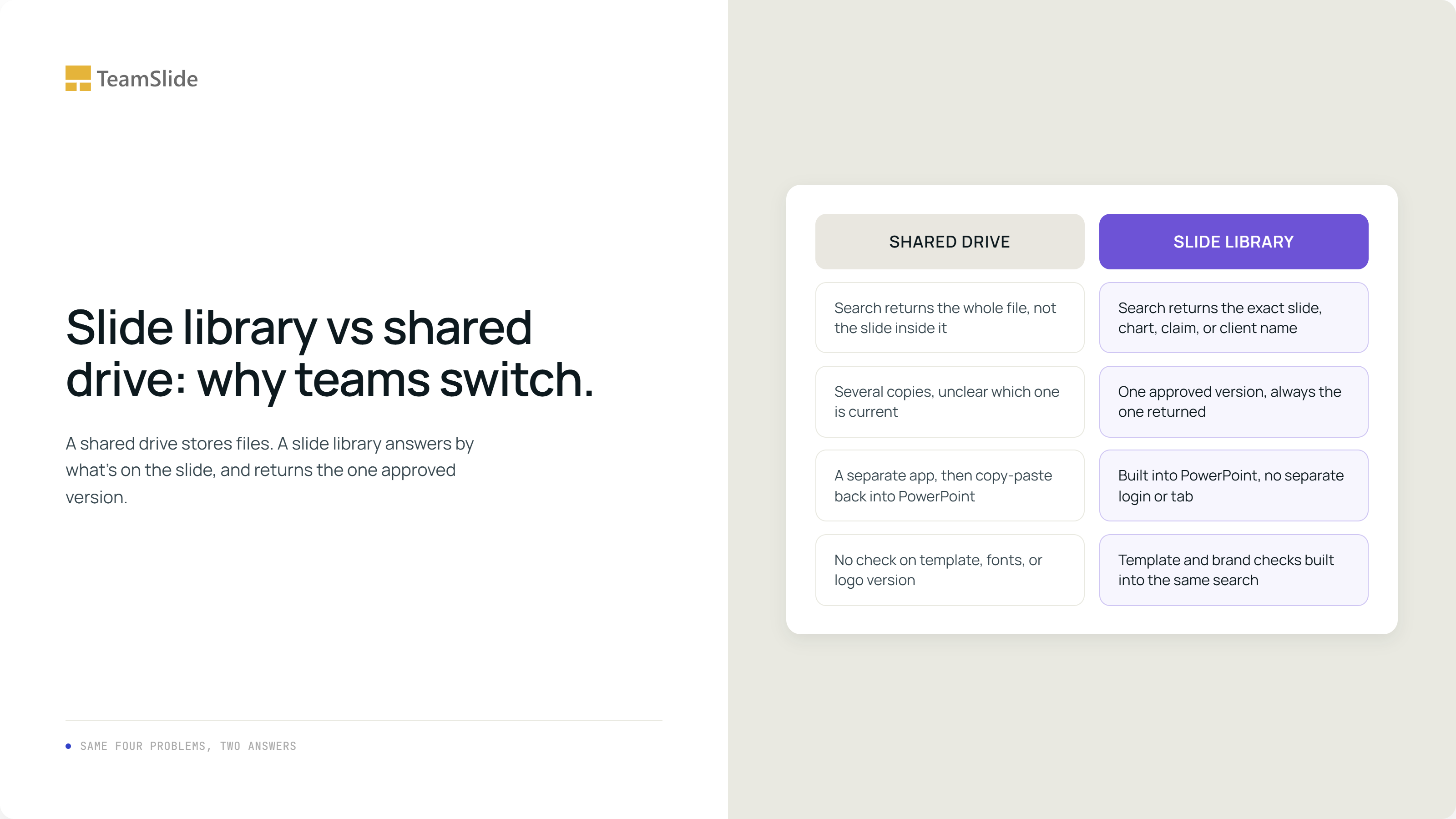
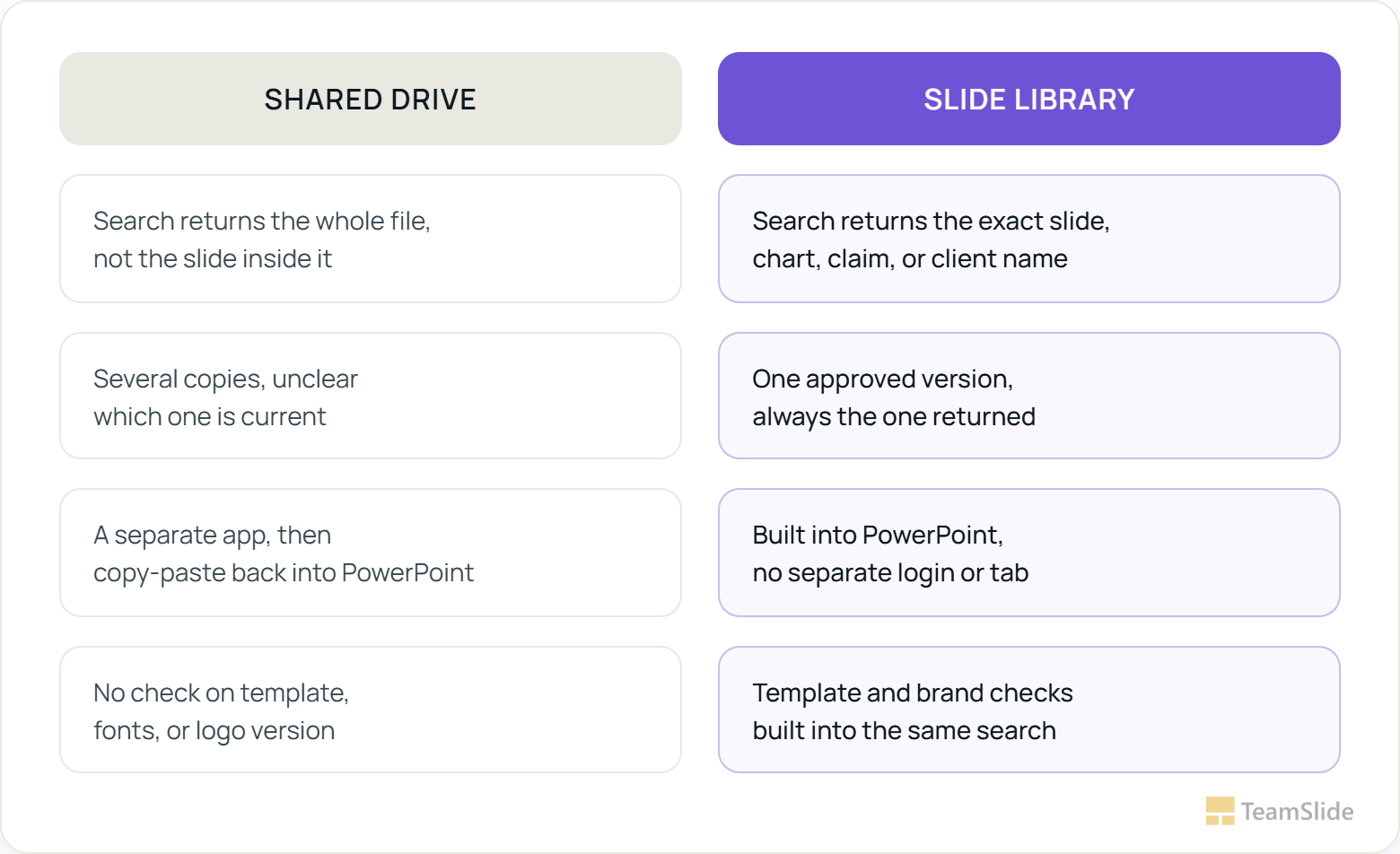
A slide library starts from the opposite assumption a shared drive makes. Instead of asking someone to remember where a slide lives, it lets them search for what's actually on the slide, the chart, the client name, the specific claim, and returns the approved version because there's only one version to return. A handful of differences tend to matter most once a team actually makes the switch.
Content search instead of file names. A team member looking for last quarter's market-sizing chart doesn't need to know which deck it originally lived in, or who built it. They search for the chart itself, the same way PowerPoint search works when it's built as a native part of the application rather than a separate tool bolted on the side.
One approved version, not five candidates. When a slide gets updated, the update replaces the source. Anyone pulling it later gets the current version automatically, instead of whichever copy happened to be sitting closest to them on the drive.
It lives inside PowerPoint itself, which sounds like a small detail until it isn't. Nobody has to leave the deck they're actively building, open a browser tab, sign into a separate tool, and copy-paste the result back in. The search happens in the same window where the actual work is happening, which is the difference between a habit people keep and one they quietly abandon after the second week.
And it usually comes with template management and brand checks built in, so the slide a search turns up isn't just current, it's already on the right template with the right fonts and logo. A presentation management system that solves search but leaves formatting and brand compliance as someone's manual job later has only fixed half the problem.
None of this requires the shared drive to disappear on day one, which is usually the part that makes teams hesitate longest.
Switching doesn't mean migrating everything on day one
The part that stalls most teams isn't deciding a slide library would help. It's picturing the migration: months of moving files, renaming things, deciding what's worth keeping. That fear is reasonable given what most content migrations actually look like. It's also, in this specific case, mostly avoidable.
A slide library typically connects to SharePoint, OneDrive, Box, Google Drive, and similar systems that a team is already using, rather than replacing them outright. Specific sites and folders get connected, and the content already sitting there becomes searchable, without anyone re-uploading a single file or restructuring a folder tree that's taken years to half-organize. The existing storage stays the single source of truth. The library just adds a layer on top that finally makes it findable.
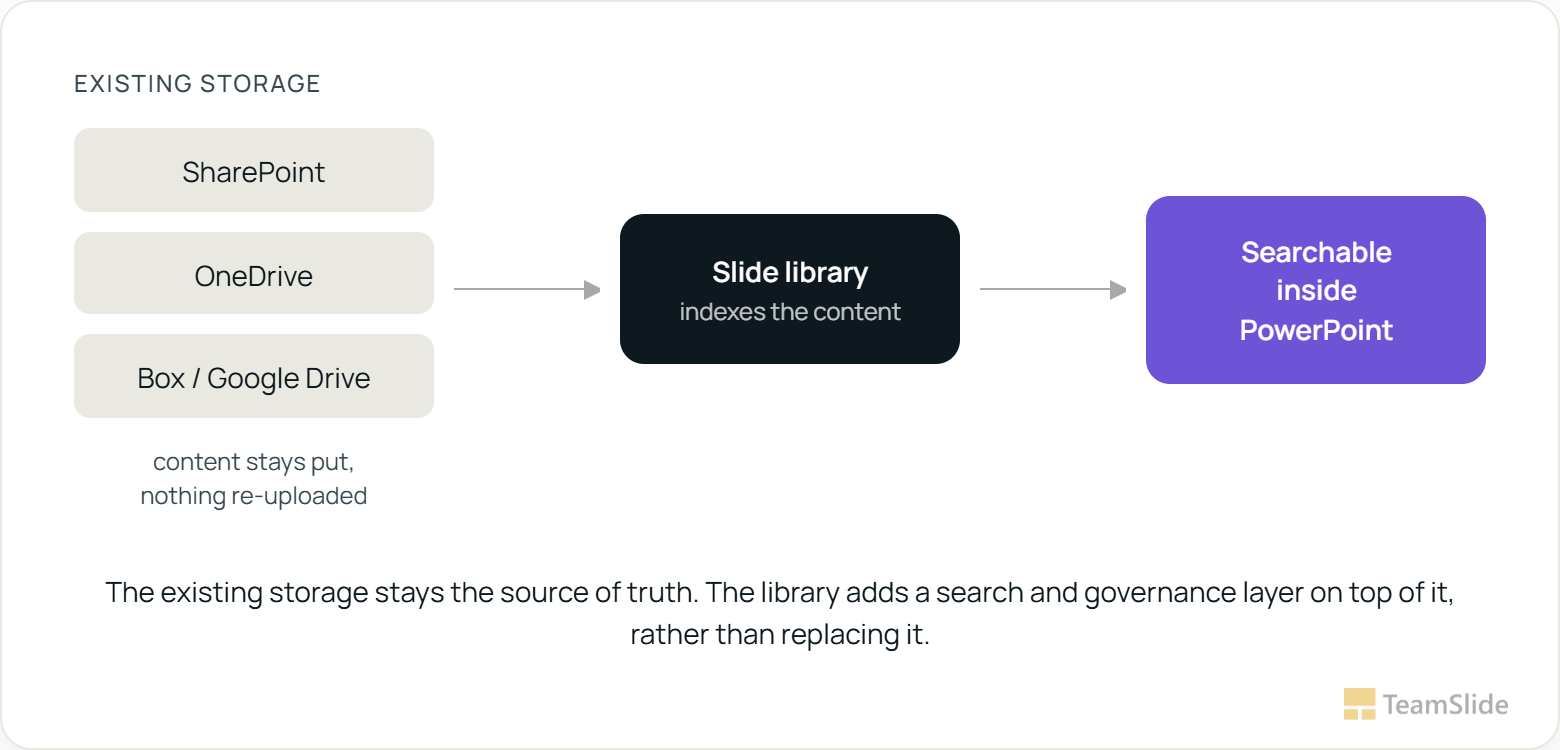
That distinction, between replacing a system and indexing it, is usually the actual deciding factor for teams that hesitate. It's also worth looking at how this has played out for teams that made the switch already, which is documented in a fuller form in our own case studies rather than taken on faith from a vendor's pitch.
The rollout that actually works in practice tends to be narrower than people expect at first. Rather than connecting every folder a company has ever created, most teams start with the handful of decks that get reused constantly, the sales deck, the standard client intro, the core case studies, and let the library prove itself there before widening the scope. A messy shared drive doesn't need to get cleaned up first. It needs one well-defined slice of it made searchable, so the value shows up in week one rather than after a quarter of preparation work.
SIGNS THE SHARED DRIVE HAS QUIETLY BECOME THE BOTTLENECK
1. One or two people have become the unofficial "keepers" of where things are.
New hires learn to ask them directly, because searching themselves rarely works.
2. New hires take weeks to find the current templates, not days.
If onboarding includes a document titled "where things live," that's the tell.
3. The same slide exists in three places, in three slightly different versions.
Nobody remembers which one was actually presented to the client last time.
4. Nobody's fully sure which logo, disclaimer, or stat is current.
Brand and legal both get looped in after the fact more often than before.
5. Rebuilding a slide from scratch genuinely feels faster than searching for it.
This is the one that actually costs the most, because it's invisible on any timesheet.
The shared drive was never really the asset. The slides sitting on it were, and until they're stored somewhere built to treat them that way, the twenty percent of the week McKinsey's research describes doesn't shrink. It just moves to a different folder, waiting for someone new to rediscover it the hard way.
See it work on your own slides before you decide.
It's easy to agree with a comparison like this in theory. What actually settles it is running a real search against your own content, live, inside PowerPoint.
→ Find right slide with one click
FAQs
What is a slide library?
A slide library is a centralized, searchable collection of a team's approved PowerPoint slides, organized so content can be found by what's actually on a slide.
How is a slide library different from a shared drive?
A shared drive stores files but has no way to search inside a deck for a specific chart or claim, and no built-in way to confirm which of several copies is current. A slide library indexes content directly and keeps one approved version, so search returns the right slide rather than a list of candidates.
Do we have to migrate everything off SharePoint or OneDrive to use a slide library?
No. A slide library typically connects to storage a team already uses, such as SharePoint, OneDrive, Box, or Google Drive, and indexes the content that's already there rather than requiring it to be moved or re-uploaded.
Does a slide library work directly inside PowerPoint?
The better ones do. A slide library built as a native PowerPoint add-in lets someone search and insert approved slides without leaving the deck they're building, which is usually the difference between a tool people actually use and one they quietly avoid.
How long does it take to set up a slide library for a team?
Most teams can connect an existing content source and start searching within 45 minutes, since the library indexes what's already there. The slower part is usually deciding which content counts as approved, not the technical setup.
Is a slide library the same thing as presentation management software?
A slide library is usually the core feature inside a broader presentation management platform, which can also include brand compliance checks, template governance, and version control layered on top of search.
How do we know if our team actually needs one?
If more than one person on the team has become the unofficial person others ask where a file is, that's usually the clearest sign a shared drive has stopped being enough. The five signs earlier in this piece are worth checking against directly.



More from our blog
Discover insights and strategies for better presentations