Enterprise Sales Presentation Management: A Complete Guide for Sales Enablement Teams

TL;DR
- Sales reps who cannot find approved slides rebuild content from scratch, introducing version errors and consuming selling time.
- Enterprise organisations with more than 50 reps across multiple regions face compounding brand and compliance risk when presentations are managed through shared folders.
- A presentation manager integrated directly into PowerPoint gives reps single-click access to approved, searchable content without changing their existing workflow.
- Teams using structured slide management report measurable reductions in presentation preparation time and improvements in brand consistency across client-facing materials.
- The operational case for centralised presentation management is strongest when multiple teams, regions, or products share a common slide repository but diverge on content governance.
Introduction
You need the competitive differentiation slide your colleague updated last week. You check the shared drive, search your inbox, and ping the marketing channel. Forty minutes later, you rebuild it from a version that turns out to be six months old.
This is not an isolated incident. It is the default operating mode for most enterprise sales teams, and it compounds with every new hire, every new product line, and every quarter. The individual cost is wasted time. The organisational cost is misaligned messaging going out to prospects at exactly the moment a deal is in play.
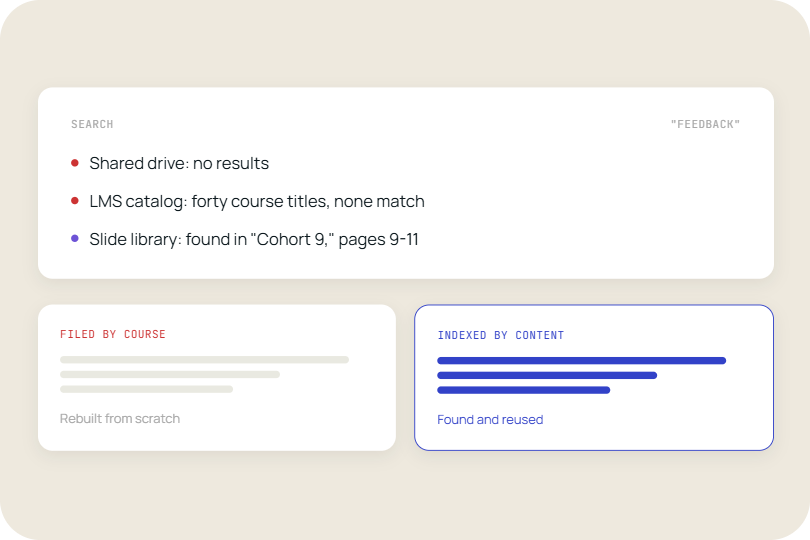
According to a 2023 Forrester report on sales content effectiveness, sales reps spend an average of 440 hours per year searching for or recreating content that already exists inside their organisation. The tension the article resolves is this: the problem is not that the content does not exist. The problem is that it cannot be found, verified, or trusted at the moment it is needed.
1. Version control breaks down the moment a presentation leaves the template
Every enterprise sales team has a master presentation. It was built carefully, approved by marketing, and distributed on a Monday morning. By Friday, seven regional variations exist, three of them contain outdated pricing, and two have a logo that was replaced in the rebrand.
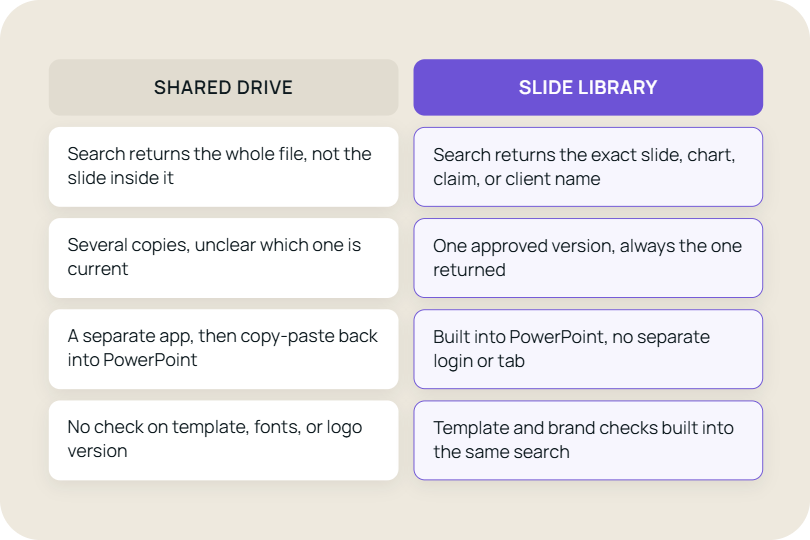
This is not a discipline problem. It is an architecture problem. When slides live in shared folders, there is no mechanism that stops a rep from saving a local copy, editing it for a call, and sharing that edited version with a colleague. The same slide exists in a dozen different versions across the file system, and there is no reliable way to know which one is current.
Research published by Seismic found that 65% of sales content created by marketing is never used by sales, often because reps cannot find it or do not trust its accuracy. The version problem is the primary driver of that gap.
A presentation manager with a single source of truth changes this at the structural level. When marketing updates a slide, every rep who accesses it through the library gets the current version. There is no action required from the rep and no risk of a stale copy circulating after a product or pricing change. See how TeamSlide’s automated version control works in practice.
2. Onboarding ramp time extends when new reps cannot find what they need
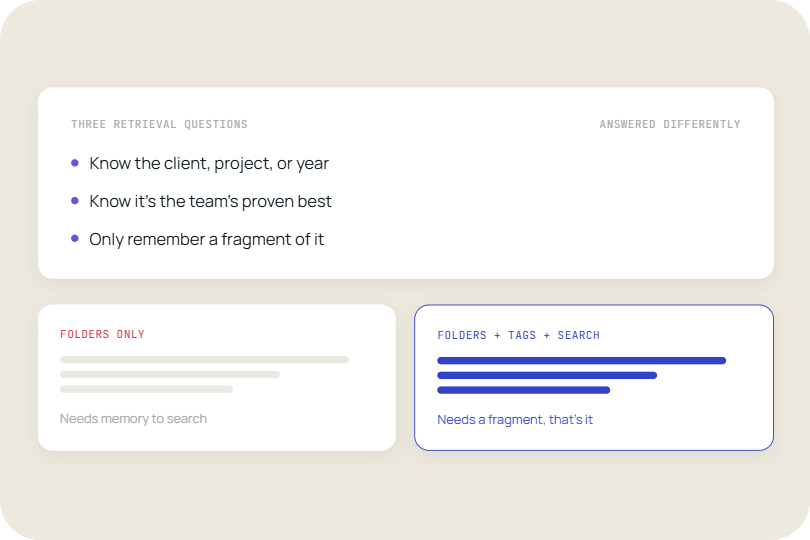
A new account executive joins a 200-person sales organisation. Their manager points them at a SharePoint folder with 1,400 files. No taxonomy. No metadata. No indication of which presentation is the current version for which vertical.
This is the standard onboarding experience at most enterprise firms, and it has a direct cost. Reps who spend their first 60 days rebuilding content from scratch, rather than selling with approved materials, delay their first qualified opportunity and extend the time to first close.
A 2024 HubSpot Sales Enablement report found that organisations with formal sales enablement programmes achieve quota attainment 15.8% more frequently than those without. Slide access is one of the most practical components of that enablement infrastructure.
When slide content is organised in a searchable library, new reps can locate the right presentation for a vertical, a deal stage, or a competitor scenario in seconds. The time they recover is reallocated directly to pipeline activity. Explore how enterprise sales teams use TeamSlide to accelerate rep onboarding.
3. Brand compliance failures accumulate in proportion to team size
A single rep building a presentation for a high-priority prospect is unlikely to use an off-brand font or an incorrect product name deliberately. But when 80 reps are independently constructing presentations from uncontrolled source files, the aggregate error rate is significant.
Brand inconsistency in client-facing materials is not a cosmetic problem at the enterprise level. For regulated industries, the compliance exposure from incorrect product claims or outdated terms in a sales presentation can be material. For any organisation with strict brand governance, inconsistent presentation assets undermine the perception of operational competence.
Agency-produced master presentations provide higher initial consistency than rep-built presentations, but they do not solve the downstream distribution problem. A design agency can produce a perfectly compliant presentation. The question is whether that presentation reaches the rep in the right version at the right moment.
According to Lucidpress research on brand consistency, consistent brand presentation across all touchpoints can increase revenue by up to 23%. Slide-level governance is one of the lowest-effort, highest-impact levers for achieving that consistency in sales contexts. Read how marketing teams enforce brand compliance in presentations without slowing sales.
4. Every presentation that goes out needs a sign-off chain
For most enterprise sales organisations, client-facing presentations require approval from at least one of: product marketing, legal, compliance, or a regional manager. The approval process is necessary. The friction it introduces is not.
When slides are managed through email chains and shared folders, the sign-off process is opaque. A rep sends a presentation for review, receives edits in a tracked-changes document, incorporates some of them, and sends the revised version without a clear audit trail of what was approved and what was modified after approval.
The risk materialises when a legally sensitive claim or a pricing commitment appears in a presentation that was not in the approved version. Without a centralised record, attributing the error or correcting it across all circulating copies is operationally expensive.
A slide library with permission controls and version history gives the approval chain a fixed reference point. The approved version is the only version accessible to reps. Post-approval edits require a new approval cycle. The audit trail is built into the system rather than reconstructed after the fact.
5. Product updates and pricing changes create immediate distribution problems
A pricing change takes effect on the first of the month. Marketing updates the master presentation and sends an all-hands email to the sales team. Three weeks later, a rep closes a deal using the old pricing presentation because they had a saved local copy and did not see the update.
This scenario is not hypothetical. It is the predictable consequence of a distribution model that relies on reps to pull updates rather than having updates pushed to the content they access. The version problem described in section one becomes most commercially damaging in the specific case of pricing and product changes.
The comparison between a slide library workflow and a shared folder workflow is sharpest here. In a shared folder model, a pricing update requires: an updated master file, a communication to the team, individual downloads, and replacement of saved local copies. Each of those steps is a failure point. In a slide library model, the update is made once and is immediately reflected in every presentation a rep builds from that point forward.
The structural shift
The five failure modes described above are not independent problems. They are the same problem expressed at different points in the content lifecycle. The underlying cause is a mismatch between how sales content is created, which is centralised and controlled, and how it is accessed, which is distributed and uncontrolled.
Presentation management is not a tooling gap that can be closed with a better folder structure or a more disciplined naming convention. It requires an architectural change that puts approved, current, searchable content at the point of use: inside the application where reps actually build presentations. What is presentation management software? A plain-English guide for enterprise sales leaders.
When the transition becomes necessary
The operational cost of unmanaged slide distribution is present in any team, but it reaches a threshold where intervention is necessary when several conditions are met simultaneously. A diagnostic checklist:
- Your team has more than 30 reps and presentation preparation time is not tracked or managed.
- More than one version of a core presentation exists in active circulation across the team.
- New reps take more than two weeks to independently locate and use approved content.
- Marketing produces updated content that is not reliably adopted by the sales team within one sales cycle.
- You have experienced at least one compliance, pricing, or brand issue attributable to an unapproved presentation version in the past 12 months.
- Your current content governance process relies on email updates and manual file replacement.
If three or more of these conditions apply, the cost of inaction is measurable: it appears in longer ramp times, higher error rates in client-facing materials, and marketing investment in content that does not reach the point of sale.
Conclusion
Enterprise sales presentation management is a content distribution problem that cannot be solved at the individual level. Discipline, naming conventions, and well-intentioned folder structures do not scale past a certain team size. The failure modes are structural, and they compound as the team, the product line, and the geographic footprint grow.
The teams that resolve this problem do so by separating content creation from content access. Creation remains centralised with marketing and design. Access is restructured so that reps work from a live, searchable layer that reflects the current approved state of the content library at all times.
The commercial consequence of making this change is concrete. Reps spend less time searching and rebuilding. Onboarding timelines compress. Brand and compliance risk from unapproved presentation versions declines. Marketing investment in content creation converts into sales use rather than sitting in a folder that reps cannot navigate. For any sales organisation where content quality and consistency are material to win rate, the case for centralised slide management is not aspirational. It is operational.
TeamSlide is purpose-built for enterprise sales teams that rely on PowerPoint. It sits directly inside the application, giving every rep single-click access to the right, approved slide for any deal stage, vertical, or competitive scenario. No migration. No new workflow to learn. If your content already lives in SharePoint, OneDrive, or another repository, TeamSlide connects directly and makes it searchable from day one.
For sales enablement leads managing 30 or more reps, the operational impact is immediate: faster presentation prep, lower brand and compliance risk, and marketing content that actually reaches client conversations rather than sitting unused in a folder structure only three people understand.
Enterprise plans are fully customisable to fit your team size, content governance requirements, and integration landscape. See TeamSlide pricing and plan options.
Book a personalised demo for your sales team and walk away with a clear picture of how TeamSlide fits your existing stack and a deployment timeline specific to your team size.
FAQ
Do companies still use presentation design agencies if they have AI tools?
Yes. Presentation design agencies provide capabilities that current AI tools do not reliably replicate at enterprise scale: original visual design, brand system development, and complex information architecture for high-stakes presentation. AI tools accelerate content drafting and template population. Agencies provide the design system that those templates are built on. The two functions operate at different layers of the content hierarchy and are not direct substitutes. Most enterprise organisations use agencies for foundational presentation design and AI tools for ongoing content generation within those design parameters.
How does presentation management help sales teams maintain brand consistency?
Presentation management improves brand consistency by ensuring that sales teams have easy access to approved, up-to-date content when building client-facing presentations. Rather than relying on reps to locate the correct files or manually apply the latest brand guidelines, approved content is governed centrally and distributed through a controlled process. When branding, messaging, product information, or legal language changes, updates can be managed from a single source of truth and made available across the organisation. This reduces the risk of outdated, inconsistent, or non-compliant materials reaching prospects and helps maintain a consistent customer experience across teams, regions, and sales cycles.
How is presentation management different from simply storing presentations in SharePoint or a shared drive?
Presentation storage focuses on where files live. Presentation management focuses on how approved content is governed, distributed, accessed, and maintained across the organisation. A shared drive may contain the correct presentation, but it does not guarantee that sales teams can easily find it, verify it is current, or use it consistently. Effective presentation management combines searchability, version control, permissions, approval workflows, and analytics to ensure that the right content reaches the right users at the right time.
When does an organisation need dedicated presentation management software?
Most teams can operate with shared folders when presentation usage is limited and content changes infrequently. Dedicated presentation management becomes valuable when multiple teams contribute to content, presentations require approvals, product information changes regularly, or brand and compliance requirements must be enforced consistently. Organisations with large sales teams, multiple regions, or complex product portfolios typically reach a point where manual distribution processes become difficult to scale and govern effectively.
How does presentation management improve sales productivity?
Sales teams lose significant time searching for content, verifying whether materials are current, and recreating slides that already exist elsewhere in the organisation. Presentation management reduces these inefficiencies by making approved content searchable and accessible within the workflow where presentations are built. Reps spend less time preparing decks, onboarding becomes faster, and marketing-created content is more likely to be used in customer conversations rather than remaining buried in folders.
What should organisations look for in a presentation management solution?
The most important capabilities are search, version control, content governance, approval workflows, analytics, and integration with existing systems such as PowerPoint, SharePoint, and OneDrive. The best solutions minimise workflow disruption by allowing users to access approved content directly within their existing presentation-building process. Organisations should also evaluate scalability, permission controls, regional content management capabilities, and the ability to track how presentation content is being used across the business.



More from our blog
Discover insights and strategies for better presentations