How Do Large Enterprises Organize Thousands of PowerPoint Slides?

TL;DR
- Enterprises with hundreds or thousands of slides in shared drives lose significant selling and productive time to content search, with research indicating employees waste nearly one full working day per week hunting for information.
- 65% of content produced by marketing goes completely unused by sales teams, largely because it is buried in folders reps cannot navigate quickly (SalesSo, 2025).
- A slide library with slide-level search, tagging, and version control solves this by making every approved slide findable in seconds from inside PowerPoint.
- Integrating a slide library with existing systems like SharePoint or OneDrive removes the migration burden, so adoption happens without changing how teams already work.
- Enterprises that implement structured slide management see measurable gains in presentation consistency, rep productivity, and content governance.
The prospect meeting is in two hours. Your rep needs the updated case study for the manufacturing vertical. She asks the team channel, gets three different file links, opens all three, and discovers none of them contain the slide she actually needs. She builds something from scratch. It goes out unreviewed.
This is not a story about one rep cutting corners. It is what happens when a growing organisation stores thousands of slides in file folders designed for documents, not for individual slides. The approved content is there. The problem is that no one can reach the right piece of it quickly enough to use it under real working conditions.
The scale of the problem is well-documented. According to Interact Research, employees waste 19.8% of their working week searching for information they need to do their jobs. For a sales team, that translates directly to less time selling and more time assembling decks from whatever they can find. The question is not whether this problem is real. The question is how large enterprises actually solve it.
1. The content problem starts with how slides are stored, not how they are made
Most enterprises do not have a slide problem. They have a findability problem. Decks accumulate across SharePoint sites, OneDrive folders, email threads, and personal drives. No single person knows where everything is, and no tool connects it.
The result is structural chaos. According to SalesSo's 2025 sales enablement research, 65% of company content goes completely unused by sales teams. The primary reason is not that the content is poor. It is that reps cannot find it when they need it, so they default to what is accessible rather than what is approved.
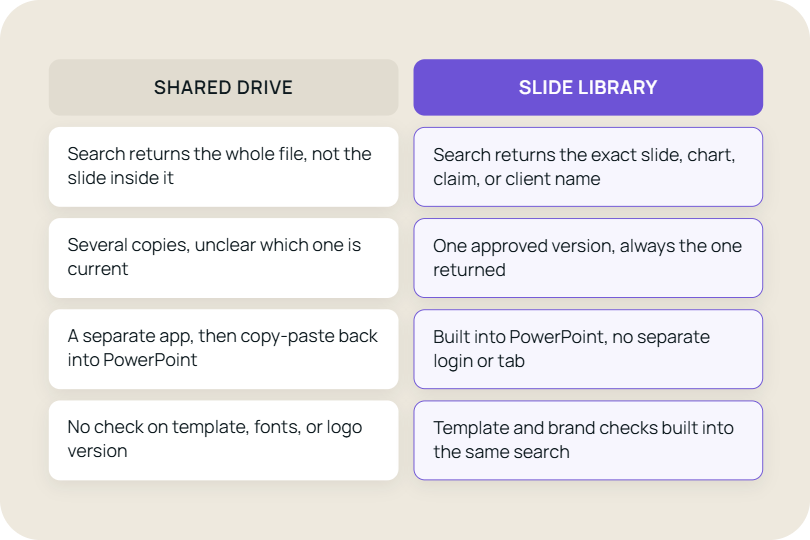
Shared drives were designed to store files, not to manage them at slide level. A PowerPoint deck is a container. When a rep needs the pricing comparison slide from the enterprise deck, they do not need the whole deck, but a shared folder gives them no way to reach that single slide directly. They open the file, scroll, copy, paste, reformat. It takes ten minutes minimum. Multiplied across a team of fifty reps doing this several times a week, the cumulative cost is significant.
A slide library solves this by indexing content at the slide level and making it searchable from within PowerPoint. Reps type a keyword, see a visual preview of matching slides, and insert the right one directly into their deck. The content stays in SharePoint or OneDrive. Nothing migrates. The only thing that changes is how fast people can reach it.
2. Shared folders create version drift, and version drift is a sales problem
When slides are not centrally managed, multiple versions of the same content accumulate across the organisation. The enterprise proposal deck exists in twelve slightly different states, each last touched by a different rep for a different deal. No one is sure which is current.
The business cost of this is not abstract. According to research cited by Lucidpress, companies with consistent brand presentation see revenue increases of up to 23%. Yet fewer than one in ten companies rate their brand consistency as strong across all customer touchpoints. Presentations are among the most frequent customer touchpoints in the sales cycle, and they are also among the least controlled.
A rep using an eight-month-old pricing slide in a late-stage proposal is not just creating a brand problem. They are creating a commercial risk. If the numbers are wrong, the deal stalls. If the messaging contradicts what the prospect heard in an earlier meeting, trust erodes.
Version control at the slide level eliminates this. When marketing updates a pricing slide, the old version is retired centrally. Every rep who searches for that slide from that point forward sees only the current version. No email chain required. No announcement needed. The update propagates automatically to everyone working from the slide library. This is the difference between a slide library with version control and a folder on a drive.
3. Searchable content is what makes large libraries actually usable
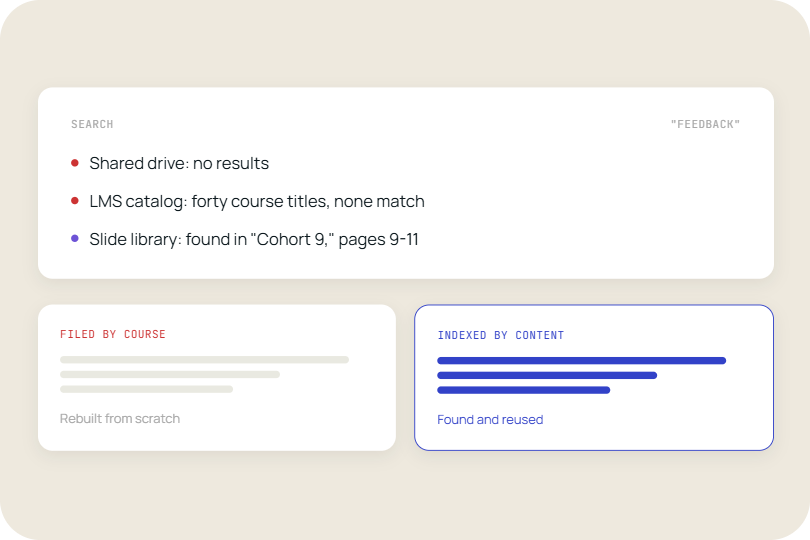
Search only works if it can actually reach the content buried inside a slide. A library of two hundred slides that only matches on filenames or folder names is still a guessing game. At enterprise scale, where libraries can run to thousands of slides across multiple product lines, regions, and use cases, the ability to search the actual text on a slide is what separates a functioning system from a digital archive.
Leading enterprises rely on search that reads the content of the slide itself, not just how it was filed. That means a rep can type "retail banking" or "competitive comparison" and surface every slide where those words actually appear, whether in a headline, a body line, or a chart label, regardless of which deck it was originally saved in or what the file was named.
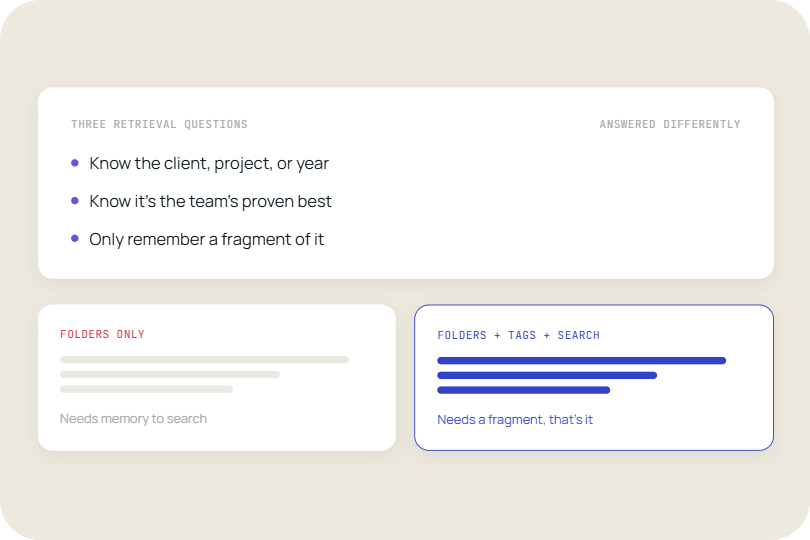
This matters because manual tagging cannot keep pace with libraries at this scale. Someone has to apply tags consistently, and tags drift out of date the moment a slide is updated or reused in a context no one anticipated. Text search has no such lag: the moment a slide exists in the library, every word on it is already searchable. The first time a rep finds exactly the slide they need in under ten seconds by typing a phrase straight from the deck, the behaviour change takes hold.
This also solves a problem tagging structurally cannot. A huge amount of what reps are looking for is language they remember seeing on a slide, not a category they'd think to filter by. Full-text search matches the way people actually recall content, surfacing slides that would otherwise require knowing the right tag in advance.
4. Integration with existing systems determines whether anyone actually uses the library
The fastest way to kill a slide library initiative is to require migration. Asking a team to recreate their entire slide repository on a proprietary platform, re-enter metadata, and retrain workflows is a change management problem most enterprises are not equipped to absorb.
The most effective enterprise slide management deployments connect to existing content systems rather than replacing them. SharePoint remains the primary document repository for most large organisations using Microsoft 365. A slide library that reads directly from SharePoint, surfaces slide-level search results inside PowerPoint, and writes updates back to the source gives teams everything they need without touching their core infrastructure.
This matters commercially. According to Salesforce's 2025 sales statistics, 42% of sales reps feel overwhelmed by too many tools, and overwhelmed sellers are 45% less likely to attain quota. Adding another standalone platform to a rep's workflow is not a solution. Adding capability inside the tools they already use, such as PowerPoint, is.
TeamSlide connects directly with SharePoint, OneDrive, Box, Google Drive, and Dropbox. Content stays where it lives. The library becomes the search and governance layer sitting on top of the existing repository, which means IT approvals are simpler, rollout is faster, and adoption is not dependent on convincing people to change their habits.
5. Permissions and governance keep the library trusted, not just full
A slide library that any user can edit freely degrades quickly. Within months, it resembles the shared folder it was meant to replace. Governance at the access layer is what keeps the content trustworthy.
Enterprises typically structure permissions by team and role. Marketing owns the master versions of brand and product slides and has full edit access. Sales reps can search, preview, and insert slides but cannot overwrite the source content. Regional teams may have their own libraries with local materials that are visible only to their geography. These rules can be set at the library, folder, or individual slide level.
The governance model also determines how new content enters the library. In well-run implementations, every slide goes through a brief review before being tagged and published. This prevents the library from becoming another dumping ground. The slide check feature in TeamSlide catches formatting errors, off-brand fonts, and outdated logos before a slide reaches the library, so reps are never in a position to present a deck that fails a basic compliance check.
Large enterprises that create these governance structures also gain visibility they previously lacked. Usage analytics show which slides are pulled most frequently, which are never used, and which are accessed immediately before being abandoned, usually because something is wrong with the content. That feedback loop turns slide maintenance from a guessing exercise into a data-driven decision.
The structural shift behind slide management at scale
For most of the past two decades, the problem of slide management was treated as a storage problem. Where do the files live? How do people access them? The tools available, shared drives, intranet portals, document management platforms, were file-level tools applied to a slide-level problem.
The shift happening now in large enterprises is a recognition that a PowerPoint deck is not the unit of content that matters. Individual slides are. A proposal is assembled from fifteen slides drawn from five different decks. A pitch for a manufacturing client reuses the ROI analysis from a healthcare deal from six months ago. Managing at the file level obscures all of this. Managing at the slide level makes it visible and reusable.
Enterprises that operate this way do not have a content overload problem. They have a content leverage advantage.
When the transition to a slide library becomes necessary
Most organisations recognise the need for structured slide management only after it becomes painful. These are the signals that the threshold has been crossed:
- Sales reps regularly send proposals built on slides that marketing does not recognise.
- A rebranding exercise takes months longer than expected because outdated slides continue circulating after the official launch.
- New hires spend their first weeks rebuilding content that experienced colleagues know exists but cannot find.
- Marketing produces new sales assets that achieve low adoption because they are hard to locate in the shared drive.
- The same slide exists in at least a dozen slightly different versions, and no one knows which is correct.
- Sales managers spend time in deal reviews correcting factual errors caused by outdated slide content.
Each of these signals represents a revenue exposure, not just an operational inconvenience. The cost of inaction is not a slow drift toward inefficiency. It is specific deals lost, specific hires slowed, and specific reputational risks sent to prospects who deserved better.
What changes when slide management works properly
When a large enterprise gets slide management right, the visible change is speed. Reps build proposals in a fraction of the time. Onboarding new hires becomes faster because approved content is immediately accessible and clearly labelled. Marketing runs rebrands with confidence because version control handles the distribution problem automatically.
The less visible change is trust. When reps know the library is accurate and current, they use it. When they use it, content quality in customer-facing materials rises. When content quality rises, the gap between what marketing produces and what actually reaches customers narrows from a chasm to a crack.
For sales enablement leads specifically, a well-run slide library is one of the few investments that directly shortens time-to-competency for new reps, improves deck consistency in late-stage deals, and gives marketing a clear feedback loop on what content actually gets used. That combination is rare. Most tools solve one of those problems. A slide library, built correctly, solves all three.
See how TeamSlide handles this
TeamSlide is built to support this transition. It sits directly inside PowerPoint, giving teams a searchable, slide-level layer that makes existing content easy to find, reuse, and manage without changing how they work. If your content already lives in SharePoint, OneDrive, or another system you rely on, there is no need to move it. TeamSlide connects directly, so your existing library becomes instantly searchable from day one.



More from our blog
Discover insights and strategies for better presentations