How can marketing teams enforce brand compliance in presentations without slowing sales?

TL;DR
- Brand compliance in sales presentations fails when approved content is harder to find than to rebuild from scratch.
- Sales reps are not ignoring brand guidelines on purpose; the non-compliant shortcut is faster, so they take it.
- A slide library embedded inside PowerPoint makes the approved version the easiest version to use.
- Governing at the slide level, not just the template level, closes the gap between marketing intent and what goes out the door.
- Teams using a structured slide library report faster deck assembly and fewer off-brand materials reaching clients.
You approved the new positioning slide three weeks ago. It went into the shared drive. Today, a rep just sent a proposal to a key account using the version from eight months ago.
For marketing ops and sales enablement leads, this is not an edge case. It is the default state of most organisations above a certain size. Approved decks exist. Reps do not use them. The gap between what marketing produces and what actually goes out to customers is where brand equity quietly drains away.
The scale of the problem is not trivial. According to a 2023 report by Lucidpress, companies with consistent brand presentation see revenue increases of up to 23%. Yet the same research found that fewer than one in ten companies rate their brand consistency as strong across all customer touchpoints. Presentations are one of the most frequent touchpoints in the sales cycle, and they are also one of the least controlled.
1. The compliant version loses when it is harder to find
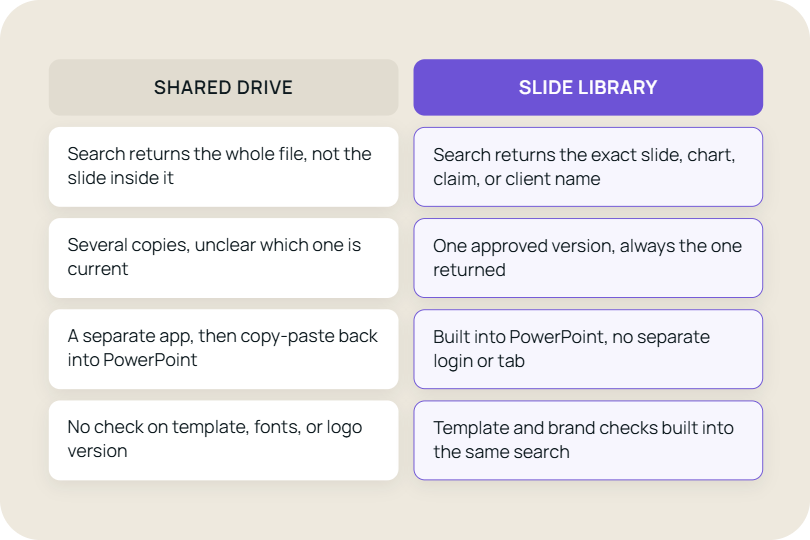
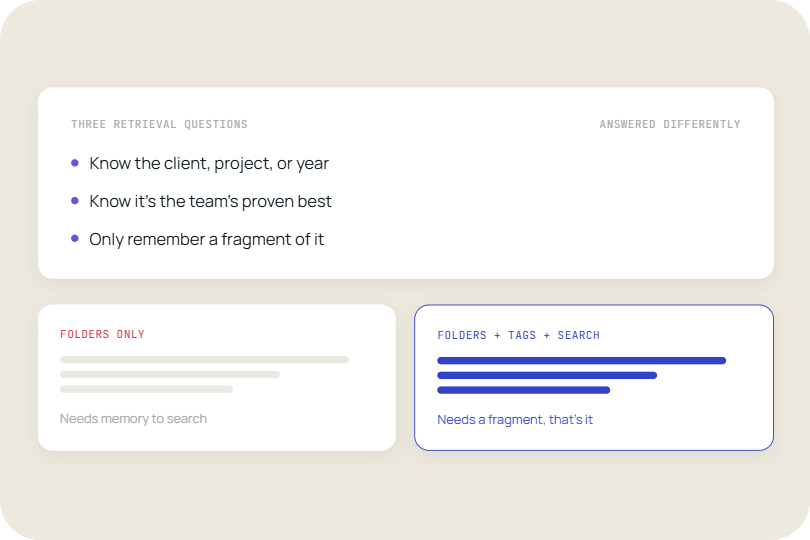
The root cause of brand drift in sales decks is not attitude; it is friction. When a rep needs a competitive comparison slide at 9pm before a morning meeting, they will use whatever is fastest. If the approved version requires navigating a shared drive, remembering which folder it is in, and downloading a file to check whether it is current, the rep will either rebuild it or pull from the last deck they worked on.
This is rational behaviour. The rep is optimising for the meeting, not for brand governance. Marketing, understandably, sees the output and concludes the guidelines are being ignored. In most cases, the guidelines are not the problem. The access model is.
A 2022 study by Seismic found that sales reps spend an average of 30 hours per month searching for or recreating content. That is almost a full working week every month spent on a task that a well-structured content system would reduce to minutes.
Slide libraries change the access model without changing how reps work. When approved content is searchable from inside PowerPoint, the approved version becomes the fastest option. Brand compliance follows from convenience, not from enforcement.
Tools like TeamSlide sit directly inside PowerPoint and connect to SharePoint, OneDrive, or other existing repositories. Reps search, find the right slide, and insert it without leaving the application they are already in. Marketing does not need to move content to a new platform to make this work.
2. Template governance is not the same as slide governance
Most marketing teams invest heavily in PowerPoint templates: locked master slides, approved colour palettes, font packages, and cover page layouts. These are worth having. They are also insufficient. Templates control the container. They do not control what goes inside it.
The compliance gap lives at the slide level. The same pricing table exists in a dozen different versions across as many personal drives. The market sizing chart has been updated by the central team, but nobody told the regional reps. The case study from a client who churned two years ago is still doing the rounds because it was the best-performing slide in the deck.
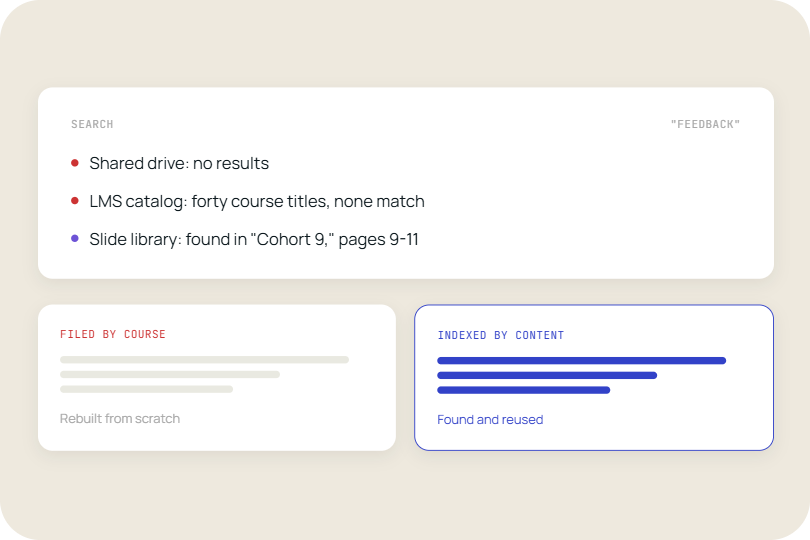
According to Forrester Research, 65% of content created by marketing is never used by sales. The most common reasons cited are that reps cannot find it, or that they do not know it exists. Slide-level management solves both problems by making individual assets discoverable rather than buried inside files.
When each slide has one source of truth, updates propagate automatically. Marketing refreshes the pricing table, and every rep who searches for that slide the following day finds the current version without being told to update their decks. The governance is invisible to the rep and effective for the team.
This is the structural shift that separates template governance from slide governance. Templates set the stage. A slide library controls what happens on it.
3. Every deck that goes out needs a sign-off chain
Regional teams adapt presentations for local markets. Product teams update messaging after a launch. Sales engineers build technical variants for different buyer personas. In a large organisation, every one of these people is making decisions about what the brand looks like to a customer. Without a structured system, those decisions are invisible to marketing until something goes wrong.
The review and approval model breaks down at scale not because people are careless but because the volume is too high for manual oversight. A central marketing team cannot review every deck before it goes out. The only viable model is one where the approved content is structurally favoured over unapproved alternatives.
In practice, this comes down to one structural principle: Approved slides are the most prominent results when reps search for content.
A slide library handles this at the structural level. When approved slides are the most prominent results in every search, reps default to compliant content without needing a manual review gate. The governance happens at the point of content discovery, which is the only place it can work at scale.
4. Locking everything is not a brand strategy
There is a version of brand governance that treats every slide as fixed and every customisation as a risk. This approach produces predictable outcomes: reps work around the system, keep their own slide banks, and share decks peer-to-peer outside any managed environment. Over-locking content does not produce compliance; it produces shadow libraries.
The practical model separates what must stay fixed from what can be personalised. Company logos, legal disclaimers, approved product names, and regulated pricing formats are genuinely non-negotiable. Customer names, deal-specific context, regional references, and supporting evidence are exactly what reps should be able to tailor.
A well-designed slide library makes this distinction explicit. Some slides are locked. Others are marked as customisable within defined limits. Reps know which is which before they start building, which removes the temptation to go off the reservation entirely.
The comparison that matters is not agency-produced decks versus rep-built decks. It is structured slide governance versus no structure at all. When reps build from a curated library with clear customisation rules, output quality is consistently higher than when they build from a personal drive with no guardrails and no visibility from marketing.
5. Usage data tells you what is actually working
Most organisations have a reasonable theory about which slides perform well. Few have data. Marketing produces content based on what seems strategically important, sales uses what wins meetings, and the two are rarely the same list. The disconnect between what gets created and what gets used is where a significant part of the content budget disappears.
A slide library generates usage data as a byproduct of normal rep activity. Which slides get inserted most often. Which gets skipped. This is not surveillance; it is feedback on a system that has historically operated without any feedback at all.
Marketing teams using TeamSlide's analytics features can see which slides drive the most engagement in deals and which approved content is being bypassed. The question that follows is not disciplinary. It is diagnostic: if the approved version is not being used, does it serve the actual conversation reps are having?
Usage data closes the loop between content creation and content performance. It turns a one-way broadcast model into a system that improves over time.
The shift that makes compliance possible
Brand governance in presentations has historically been treated as a communication problem. If reps only understood the guidelines better, or if the latest templates were shared more clearly, the decks going out to customers would look right. This framing puts the solution in messaging and training, and it has not worked at scale.
The more accurate framing is that this is a systems problem. Reps use what is fast and what is accessible. Compliance follows from system design, not from awareness. When the approved content is the easiest content to reach, the behaviour follows without enforcement.
When the current approach is no longer working
Most teams reach a point where the volume of content, the number of reps, or the pace of product change makes the existing model unsustainable. These are the signals:
- Marketing produces slide updates that take weeks to propagate to the sales team.
- Reps regularly ask where to find specific slides rather than finding them independently.
- Multiple versions of the same slide exist across individual drives and email threads.
- Outdated content continues to circulate because there is no retirement process.
- Brand audits after the fact find materials in market that nobody in marketing approved.
- Regional or product teams maintain their own parallel slide collections outside the central system.
Each of these is individually manageable. When three or more are present simultaneously, the informal workarounds have become the de facto system. The cost of inaction is not just brand inconsistency; it is compounding content debt that grows faster than any team can manually address.
What changes when the system changes
The organisations that get brand compliance right in presentations are not the ones with the strictest enforcement. They are the ones that made the approved path faster than the workaround.
That means searchable, slide-level content accessible inside PowerPoint. It means version control that retires outdated material. It means usage data that tells marketing what is actually serving the sales conversation versus what is being bypassed. And it means clear rules about what is fixed and what can be personalised, so reps do not have to guess.
The commercial implication is direct. Shorter deck-building time per rep, multiplied across a sales team, is recovered selling time. Fewer brand inconsistencies reaching customers reduces the risk of compliance issues in regulated industries and protects the perception that marketing has spent budget building. A slide library is not a content management project; it is a sales efficiency decision with measurable output.
See how TeamSlide closes the brand compliance gap
Most teams who come to TeamSlide are not looking for a content management system. They are looking for a way to stop reps building decks from scratch at the wrong time with the wrong slides. TeamSlide sits inside PowerPoint, connects to SharePoint or OneDrive without moving a single file, and makes every approved slide searchable in under ten seconds.
If brand compliance is costing your team time in review cycles, rework, or post-send corrections, the fix is structural, not behavioural.
Schedule a demo to see it working inside your PowerPoint environment, or explore brand compliance version control to see how slide-level governance works in practice.
Frequently asked questions
How do slide libraries help sales teams stay on-brand?
A slide library gives sales reps a single, searchable source of approved content that is accessible from inside PowerPoint. Because the approved slide is the fastest slide to find, reps use it rather than rebuilding from scratch or pulling from old decks. Marketing controls what appears in the library, can retire outdated material, and can update slides centrally so every rep automatically works from the current version the next time they search. Brand compliance follows from the system design rather than from manual policing.
What is the difference between a slide library and a shared folder?
A shared folder stores files. A slide library operates at the slide level, making individual slides searchable and insertable without opening a separate file. Shared folders require a rep to know which file contains the right slide, download or open that file, copy the slide, and paste it. A slide library returns the specific slide in a search result and inserts it in one step. Slide libraries also support version control, usage tracking, and content retirement, none of which are available in a standard shared folder structure.
Can marketing enforce brand standards without reviewing every deck before it goes out?
Yes. At scale, pre-approval of every deck is not viable. The alternative is to control the inputs rather than the outputs. When the only slides in the library are approved slides, and when the library is the fastest way to build a deck, the output is compliant by default. Governance shifts from reviewing finished decks to curating the content that reps draw from. Marketing teams using slide libraries typically focus their review effort on updating and retiring library content rather than auditing individual presentations after the fact.
How long does it take to migrate content into a slide library?
With a tool like TeamSlide, there is no migration required if your content already lives in SharePoint or OneDrive. TeamSlide connects directly to your existing repository and makes it searchable at the slide level from day one. For organisations with content spread across multiple drives or local storage, an initial curation exercise is recommended to establish a single source of truth. The timeline depends on the volume of content, but most teams complete an initial library setup within a few weeks rather than months.
Do reps need training to use a slide library?
A well-designed slide library requires minimal training because it works the way a search engine does. Reps type what they are looking for, see results, and insert. The learning curve is close to zero for anyone who uses Google. The more significant change is behavioural: reps who are used to working from personal slide banks need to see that the library is faster before they switch. In practice, the first time a rep finds exactly the slide they need in under ten seconds, the behaviour change follows without further encouragement.
What happens to brand compliance when a company rebrands or updates messaging?
A rebrand is where the difference between a slide library and a shared folder becomes most visible. In a shared folder model, outdated materials continue to circulate for months because there is no mechanism to retire them. In a slide library with version control, marketing updates or replaces slides centrally, marks the old versions as retired, and the updated content becomes the only option in search results from that point forward. Reps working on new decks after a rebrand automatically use the new materials without any communication or reminder required.



More from our blog
Discover insights and strategies for better presentations