How to Master Your PowerPoint Slide Library: A Guide to Brand-Consistent Presentations

TL;DR
- A slide library is a searchable, centralised store of approved slides that teams can access directly inside PowerPoint, without hunting through shared drives.
- Teams that rely on shared folders waste significant time rebuilding slides that already exist somewhere in the organisation.
- Brand inconsistency in outbound decks is a measurable problem: sales reps who build their own slides from scratch are far more likely to send off-brand materials to prospects.
- A slide library combined with a PowerPoint add-in removes the friction of version control by making the latest approved slide the easiest one to find.
- The transition from a shared folder to a slide library does not require moving files: tools like TeamSlide connect to existing SharePoint or OneDrive storage from day one.
Introduction
The presentation went out with a slide describing a product feature that had been discontinued months earlier. Nobody caught it.
For sales enablement leads and marketing ops managers this is the failure mode that matters most. Not the time wasted searching for slides, but the moment a client-facing deck goes out carrying the wrong information, the old brand, or a figure nobody can stand behind. The search problem is visible and frustrating. This problem is invisible until it is not.
The cause is the same regardless of team size or industry: presentation content has no home. Slides get approved once and then released into a file structure that has no mechanism for keeping them current, surfacing the right version, or retiring the wrong one. According to the Lucidpress Brand Consistency Report, only 25 per cent of organisations describe their brand as consistently applied across channels. For most teams, the gap between brand guidelines and what actually goes to clients is not a design problem. It is a distribution problem, and a slide library is the fix.
1. Finding the right slide takes longer than building a new one
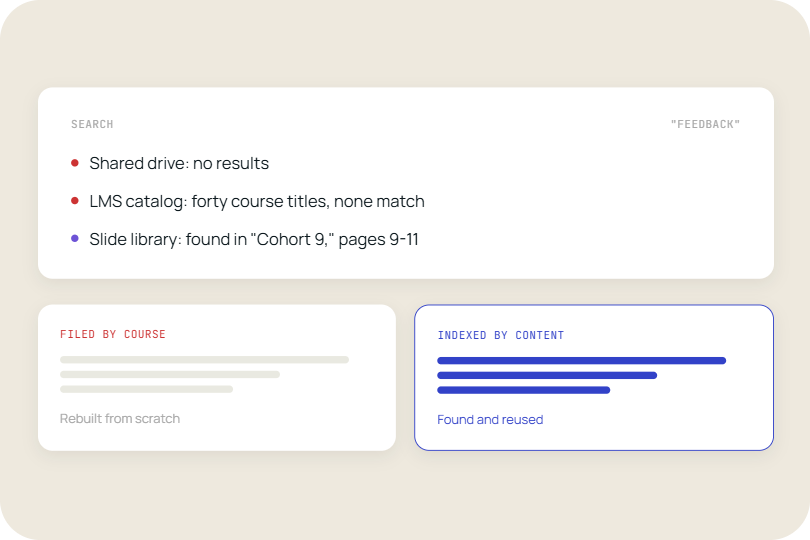
The search problem is the root cause of most slide inconsistency in large teams. When finding an existing slide takes longer than rebuilding it, people rebuild it, and the rebuilt version is never quite right.
Sales reps under time pressure do not stop to verify whether last quarter's pricing slide is still current. They pull whatever they can find quickly, update the numbers from memory, and send the deck. The result is multiple versions of the same slide circulating simultaneously, none of them clearly authoritative.
A 2023 Forrester study commissioned by Seismic found that sales reps spend an average of 30 hours per month searching for or recreating sales content. That is almost a full working week every month, per rep, on content logistics rather than selling.
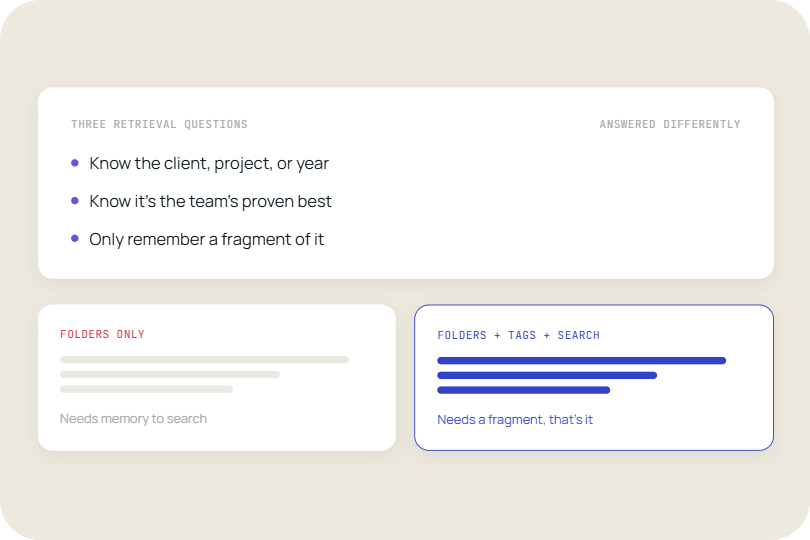
A slide library fixes this by making search the default behaviour. When slides are tagged, versioned, and accessible from a search bar inside PowerPoint, the fastest path to a slide is also the correct one. Reps find the approved slide in seconds and never have the incentive to rebuild from scratch.
TeamSlide's slide search functionality works directly inside PowerPoint, making it faster than digging through old presentations to find the right slide.
2. Shared folders are not version control
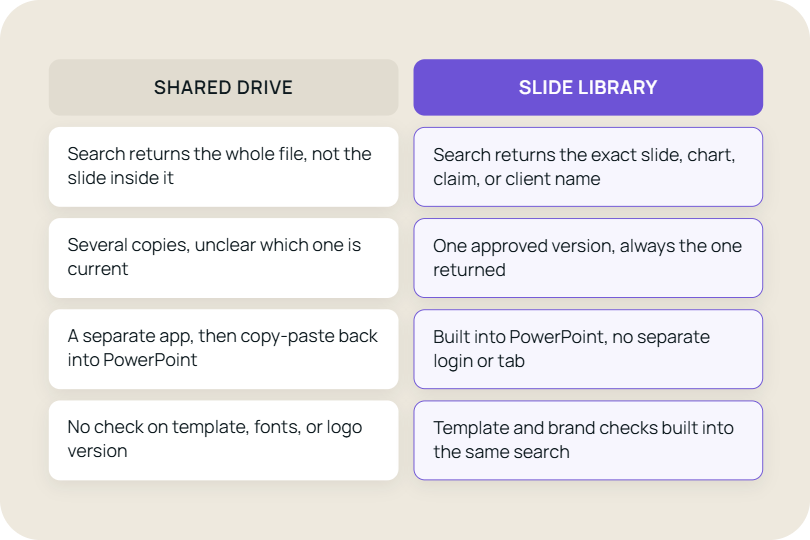
Most teams treat a shared folder as a slide library. It is not. A shared folder is a storage location. A slide library is a governed system with clear ownership, versioning, and access logic.
The difference matters because shared folders accumulate history without discarding it. Every time someone saves a new version of a deck, the old one stays visible. People download the wrong version, circulate it internally, and sometimes send it to clients. The same slide then exists in a dozen different files across the organisation with no way to know which is current.
A 2022 report by Gartner on content management found that poor content findability costs knowledge workers an estimated 20 per cent of their productive time. For teams whose primary output is presentations, that loss is concentrated in exactly the wrong place.
A slide library solves this by separating the storage layer from the access layer. The files can still live in SharePoint or OneDrive, but the library puts a searchable, version-aware interface on top. When the brand team updates a logo or changes a colour, they update one master slide, and every team pulling from the library automatically gets the current version on their next search.
TeamSlide connects to SharePoint article explains the technical setup in detail.
3. Brand compliance breaks at the point of customisation
Most organisations have brand guidelines. The gap is between having guidelines and enforcing them at the moment a rep or consultant actually builds a deck.
Brand asset management tools cover logos, fonts, and colour palettes. They rarely extend into slide-level control. A sales rep who knows the approved font is Calibri but is working from a template three versions out of date will still produce an off-brand deck, not out of carelessness but because no approved slide existed for the content they needed.
The cost is not abstract. The Forrester study found that sales reps spend an average of 30 hours per month searching for or recreating sales content. A significant share of that time goes on slides: finding a case study, rebuilding a pricing page, reformatting a slide that exists somewhere but cannot be located. Every hour spent on that task is an hour not spent in front of a buyer.
The comparison that matters here is not between two software tools. It is between a rep who builds a slide from a blank template and a rep who inserts a pre-approved slide from a library. The first rep has unlimited creative latitude and no guardrails. The second rep has a deck that looks like it came from the same company as the last deck the client received.
A slide library does not restrict what teams can say. It restricts what slides look like, which is exactly the right constraint to apply at scale.
4. Slide governance fails when it depends on human memory
Governance sounds like a process problem. It is actually a product problem.
Most slide governance frameworks require someone to remember to check whether a presentation is compliant before it goes out. That person is usually a marketing manager or brand lead who is also responsible for five other things. The review happens inconsistently, or not at all when a deadline moves up.
When compliance depends on a manual gate, it breaks under pressure. Deadlines compress, review steps get skipped, and the deck that goes to the client is the one the rep finalised at 11pm without a brand check.
A Harvard Business Review analysis of compliance behaviour found that checklists and process gates only hold when they are embedded in the workflow, not appended to it. Slide governance appended to a deadline-driven workflow will always lose.
TeamSlide's slide checker addresses this by moving the compliance check inside PowerPoint, where it runs against slides already in a deck and flags anything that does not match the current approved version. The governance happens at the point of creation, not as a separate sign-off step.
The structural shift most teams avoid
The common thread across all four of these problems is that they are caused by treating presentation content as an output rather than an asset. Outputs get filed and forgotten. Assets get organised, versioned, and maintained.
Teams that make this shift stop measuring success by whether a deck got sent and start measuring it by whether the content inside the deck was findable, current, and approved. That is a different operating model, and it requires a different set of tools to support it.
What changes when slide management becomes a system
Slide libraries are not a new idea. What has changed is how accessible they are to implement. A team does not need to migrate content, rebuild a filing structure, or train people on a new platform. The starting point is the content that already exists, wherever it currently lives.
The measurable outcomes are specific. Reps spend less time searching and more time selling. Brand reviews catch fewer errors because fewer errors make it into decks. New team members become productive faster because finding content is no longer an institutional knowledge problem.
A managed slide library also changes the relationship between central teams and field teams. Marketing and brand leads stop being the people who send correction emails after the fact and start being the people who own the source of truth that the whole organisation draws from.
For any team that measures win rates, client satisfaction, or brand perception, the slide library is not a productivity tool. It is the operational infrastructure that makes those metrics improvable.
The reason most teams never fix their slide problem is that fixing it sounds like a project. TeamSlide is not a project. It sits inside PowerPoint, connects to your existing storage, and makes your content searchable at the slide level without moving a single file. Your library is ready from day one.
FAQ
What is a PowerPoint slide library and how is it different from a shared folder?
A slide library is a governed, searchable system for storing and accessing approved presentation slides. Unlike a shared folder, it includes versioning, tagging, and access controls that ensure the slide a team member finds is the current approved version. Shared folders accumulate historical files with no mechanism for distinguishing current from outdated content. A slide library puts a searchable interface on top of existing storage so that the fastest route to a slide is also the correct one. Tools like TeamSlide connect to SharePoint or OneDrive without requiring content migration.
How does a slide library help sales teams stay on-brand?
A slide library keeps sales teams on-brand by making approved slides the easiest slides to use. When reps can find a pre-built, brand-compliant slide in seconds from inside PowerPoint, they have no reason to rebuild from scratch. The risk of off-brand decks comes from friction in the approval process: reps under deadline pressure use whatever is quickest. A slide library removes that trade-off by making speed and compliance the same choice. Some libraries, including TeamSlide, also include a presentation checker that flags slides already in a deck that do not match current approved versions.
What is the slide master in PowerPoint and how does it relate to a slide library?
The slide master in PowerPoint is the top-level template that controls the default layouts, fonts, colours, and spacing for every slide in a file. It sets the starting conditions for a presentation. A slide library operates at a different level: it manages individual slides that already exist, allowing teams to search for and reuse specific content rather than rebuilding from a blank template. The slide master defines what a new slide looks like. A slide library determines which existing slides a team can find and insert. Both contribute to brand consistency, but they solve different parts of the problem.
What are PowerPoint add-ins and do I need one to use a slide library?
A PowerPoint add-in is a tool that extends the functionality of PowerPoint by adding a panel, toolbar, or feature directly inside the application. Some slide library solutions, including TeamSlide, operate as PowerPoint add-ins, which means teams can search for and insert approved slides without leaving PowerPoint or switching to a browser. Not all slide libraries work this way: some are web-based portals that require downloading a slide and importing it manually. An add-in-based library reduces friction significantly because the search and insert workflow happens in the same tool the user is already working in.
How does brand asset management relate to slide management?
Brand asset management covers the storage and governance of brand files such as logos, fonts, colour palettes, imagery, and brand guidelines. Slide management is a subset of this that deals specifically with presentation content. Many brand asset management systems do not extend to slide-level control, which means a team can have approved logos and fonts but still produce off-brand decks because the slide templates or content blocks they are working from are outdated. A slide library fills this gap by applying asset management logic specifically to presentation content, including versioning, search, and compliance checking at the slide level.



More from our blog
Discover insights and strategies for better presentations