What Is Presentation Management Software? A Plain-English Guide

Your team just lost a pitch. The deck used outdated numbers, a pulled case study, and unapproved pricing.
Nobody made a mistake. The system did.
This is not a one-off problem. Forrester's State of B2B Content Survey, 2024 found that just over half of marketers cite inefficient content creation and misalignment between sales and marketing as their biggest content operations challenges. For consulting and professional services teams, where a single deck can determine whether a client relationship advances or stalls, the cost of that misalignment is direct.
What presentation management software actually does
Presentation management software is a system that makes slide content searchable, reusable, and controlled across teams.It is a layer that sits between your teams and their slide content, making it possible to find, reuse, and control decks without needing to rebuild them every time.
The simplest way to understand it: a shared, searchable library for slides. Not for whole files only, but for individual slides inside those files. A sales rep can search for 'case study retail' and find the three most recent, approved retail case study slides, ready to pull into a proposal. No emailing colleagues. No digging through folders. No rebuilding.
Beyond search, presentation management tools typically handle:
- Version control, so teams are always working from the approved deck, not a saved copy from eight months ago
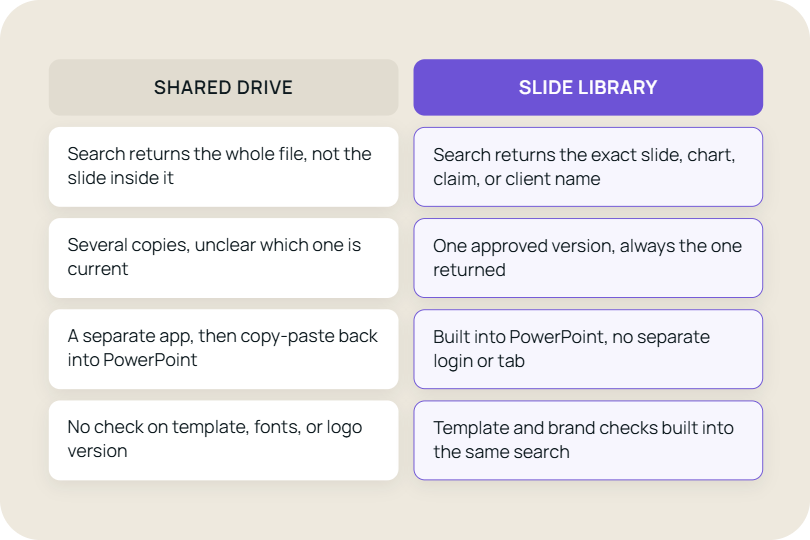
- Brand compliance, so logos, fonts, and templates are applied consistently across every file that goes out
- Access permissions, so the product roadmap does not end up in a client deck because a rep pulled the wrong slide
- Usage tracking, so content leads can see which slides actually get used in deals and which ones get ignored
For sales enablement and marketing ops teams, this shifts the job from fire-fighting to infrastructure. Instead of answering 'where is the deck for X', you build a system where X is always findable.
The Forrester Wave: Revenue Enablement Platforms, Q3 2024 identified content management as one of the two core capability pillars that determine whether enablement teams can measurably impact sales outcomes. The other is readiness. Neither works without infrastructure for finding and reusing approved content.
When a slide library is in place, a consultant preparing a pitch does not ask the engagement manager for slides. They search, they find, they send.
Why shared drives fail for presentations
Most teams already have somewhere to store presentations: SharePoint, Google Drive, a shared network folder. The question is why that is not enough.
A shared drive organises by file. Presentation management software organises by slide. This sounds like a small distinction. In practice, it changes everything about how teams actually work.
Before: A consultant spends 45 minutes rebuilding a slide that already exists in a past project.
After: The same slide is found in 10 seconds through search and reused instantly.
In a shared drive, finding the right content means: knowing roughly which file it is in, opening that file, scrolling through to the slide, and then manually copying it into your own deck. If you do not know which file to look in, you search folder names and hope for the best. If the file has gone through ten versions, you do not know which one is current.
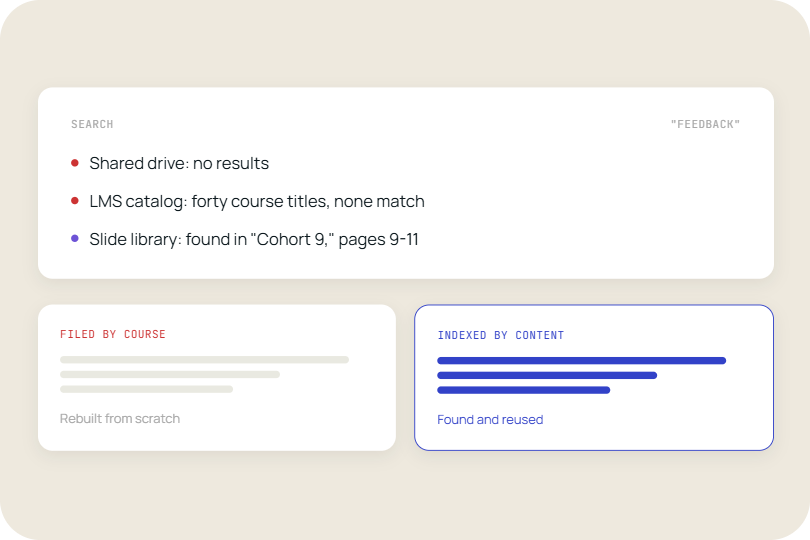
A slide-level library solves all three problems at once. The content is indexed by slide, not by file. Search returns specific slides, not a list of documents to open. And because the library connects to your existing storage rather than replacing it, there is no migration project and no data duplication.
The McKinsey Global Institute's Social Economy report found that knowledge workers spend close to 20 percent of their working week searching for internal information. In consulting, that is not an abstract productivity loss. It is time billed to a client that was spent hunting through project folders.
Consulting operations teams see this acutely. Approved frameworks, client case studies, and sector-specific slides are often sitting in SharePoint or a network drive. But junior consultants do not use them, because finding the right slide in a 60-slide engagement summary is slower than building something from scratch. A slide-level search layer fixes the discovery problem without touching the storage infrastructure.
Where the problem shows up most
The teams that need this most are the ones whose output is measured by what they present.
Sales teams face a parallel version of the same problem. A rep customising a proposal for a large account needs product positioning, pricing, legal language, and relevant case studies, often the same day. Without a slide library, they pull from saved personal copies or email colleagues for files. The result is decks that are inconsistent, outdated, and off-brand before they even reach the client.
Marketing operations carry the problem from the other direction. They produce approved content, but have no visibility into what gets used. A presentation management tool gives them usage data: which slides appear in deals, which templates get ignored, and which case studies are being sent to the wrong verticals.
Consulting firms are not immune either. A typical engagement team pulls content from multiple sources simultaneously: sector overviews, proprietary frameworks, client-specific analysis, benchmark data, and case studies from similar mandates. Without a central library, associates build from memory or ask upwards. Senior consultants spend time replicating work that already exists in a closed project folder. Partners approve decks they cannot fully trace.
The common thread across all three groups: the content exists, but the system for accessing and reusing it does not.
What actually improves (and what Stops happening)
Ask your sales team how they describe the product. Then ask marketing. Then ask the strategy team. Chances are you will hear three different answers. None of them are wrong exactly, but together they create a problem. When every team builds their own version of the core story, what gets said to a prospect, a client, or a board member depends entirely on who happens to be in the room.
This is the problem presentation management software solves at the team level. When everyone pulls from the same approved slide library, the story stops fragmenting.
The operational changes are concrete. Approval cycles get shorter because the approved version is already accessible. Brand reviews become less frequent because reps are not building from scratch. Onboarding new sales hires takes less time because the best-performing pitch content is findable rather than tribal knowledge held by senior reps.
For consulting operations leads, the change is also visible in knowledge retention. When a project closes and the team disbands, the work no longer disappears into a folder nobody will open. The strongest slides, the sharpest frameworks, the most reusable client evidence, all surface in the library where the next team can find them. Institutional knowledge stops walking out the door with every engagement closed.
The questions to ask before choosing a tool
Not all presentation management tools work the same way. The differences that matter most are not features; they are integration points and workflow impact.
The first question is where teams will access the library. A tool that lives inside PowerPoint changes adoption rates entirely compared to one that requires opening a separate browser tab. For sales teams already working in PowerPoint for every client interaction, native integration removes the switching cost.
The second question is where your content currently lives. If your slides are in SharePoint or OneDrive, a tool that connects directly to those systems avoids a migration. You do not need to rebuild the library from zero. The existing content becomes searchable on day one.
The third question is who manages it. Some tools require a dedicated admin to tag, organise, and maintain slides. Others index content automatically and let content owners manage their own sections. For lean enablement teams, the admin burden is a real constraint.
The XeniT study on enterprise information search found that employees consistently waste time searching for information that already exists inside their own organisations. The right tool does not ask teams to fix that problem manually by reorganising their storage. It fixes it structurally by indexing what is already there.
There is a version of this purchase that creates a new content management problem on top of the old one. The right tool simplifies how teams access content without requiring anyone to change how they store it.
The structural shift
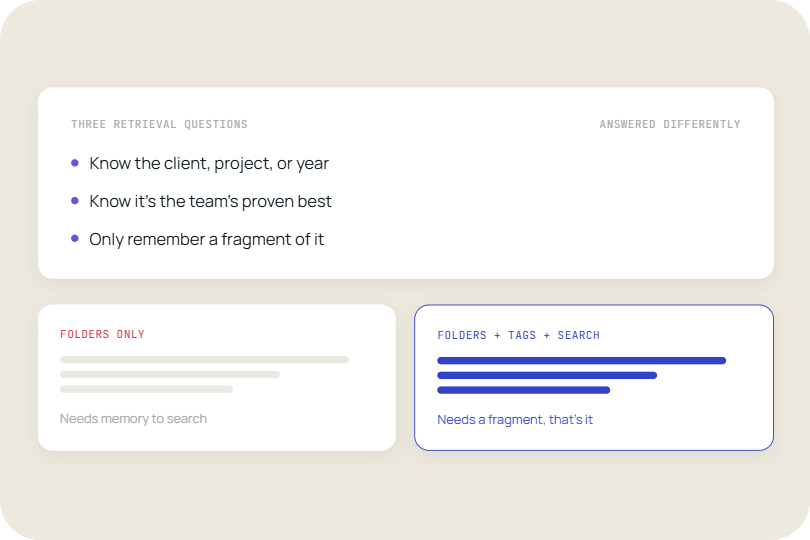
The problem presentation management software addresses is not really a technology problem. It is a design problem. Most organisations built their content infrastructure around files and folders because that was the unit that storage systems understood. Teams adapted their behaviour to the constraints of the system.
Slide-level search and management inverts that. The system adapts to how teams actually use content: by topic, by use case, by audience, not by folder name or file date. When the infrastructure matches the workflow, the friction disappears.
The tools that work best are not the ones that ask teams to change the most. They are the ones that sit closest to where the work already happens.
When the Transition Becomes Necessary
Most teams recognise the problem only when it starts affecting deals, delivery timelines, or client trust.
A few questions to test whether your current setup is holding the team back:
- Junior consultants are rebuilding frameworks or case study slides that already exist in a closed project folder
- Senior staff are spending time on deck approval cycles that could be eliminated if the approved version were simply accessible
- Sales reps are customising proposals with content nobody has signed off on in the last six months
- Marketing cannot tell which slides are being used in active deals or which case studies are being sent to the wrong clients
- Onboarding new hires includes a handover of personal slide collections because no library exists
- A key piece of content exists somewhere but nobody can find it without asking a specific person
If three or more of those are true, the cost of inaction is not theoretical. It is showing up in billable hours spent rebuilding existing work, in proposals sent with outdated content, and in the time your senior people spend answering slide requests instead of doing the work.
Conclusion
Presentation management software is a specific fix for a specific failure: content that exists inside an organisation but cannot be found or reused by the people who need it, at the moment they need it.
For consulting and professional services teams, that failure is expensive in a way that is easy to quantify. Rebuilt slides are billed time or unbilled rework. Outdated content in client decks is a credibility risk. Proprietary frameworks buried in closed project folders are institutional knowledge that never compounds. A slide library addresses all three.
For sales and marketing teams, the failure shows up differently but consistently: inconsistent pitches, invisible content investment, and reps who build from scratch because finding the right slide takes longer than creating a new one.
The starting point does not require a migration or a content audit. It requires connecting the content your teams already have to a search layer that makes it visible. The library you need largely exists. The problem is that nobody can find it.
The tools that work best sit closest to where the work already happens. TeamSlide is built to support this transition. It sits directly inside PowerPoint, giving teams a searchable, slide-level layer that makes existing content easy to find, reuse, and manage without changing how they work. If your content already lives in SharePoint, OneDrive, or another system you rely on, there is no need to move it. TeamSlide connects directly, so your existing library becomes instantly searchable from day one.
Schedule a demo to see how your existing slides can become a searchable, reusable system from day one.



More from our blog
Discover insights and strategies for better presentations