Why Enterprise Deals Stall in the Final Stage (And What Your Slide Deck Has to Do With It)

TL;DR
- Inconsistent slide content is one of the most common, least-discussed reasons enterprise deals stall in the final stage.
- Sales reps operating with outdated or locally-modified decks send conflicting signals to procurement and legal reviewers at exactly the wrong moment.
- The fix is not better design or more training. It is a single, governed content source that reps pull from directly inside PowerPoint.
- Deck personalization, when done with accurate and on-brand content, is a proven method for closing the credibility gap in complex sales cycles.
- TeamSlide connects directly to SharePoint and OneDrive, making governed slide content searchable at the slide level from inside PowerPoint without changing how reps already work.
The deal has been in late stage for six weeks. The procurement team requests one more deck, tailored to their use case. Your rep sends something. Three days later, the buyer's legal contact replies asking why the pricing slide contradicts the commercial terms attached to the proposal.
This is not a communication breakdown. It is a content infrastructure problem. Somewhere between the proposal and the final deck, a slide got pulled from an old folder, a number got updated locally, or a region-specific version of a case study replaced the approved one. The buyer sees two versions of the same company. That is enough to introduce doubt. In a competitive late-stage deal, doubt is fatal.
According to a 2023 Salesforce State of Sales report, sales reps spend only 28% of their time actually selling, with the remainder consumed by administrative tasks including content search and deck preparation. The compounding effect is this: reps who cannot find accurate, current slides build their own. And the versions they build are not always consistent with what was promised earlier in the buying process.
The buying environment compounds the pressure. Custify research shows the average B2B buying committee has grown from 3 to 5 people a decade ago to 8 to 12 today, with the average SaaS selling cycle now at 134 days, up 25% since 2022. More reviewers across a longer cycle means more opportunities for an inconsistent deck to surface at the wrong moment. The rep is not just building for the person they spoke to. They are building for every stakeholder who will open that file independently.
1. The slide your rep used last week is probably not the approved one
Late-stage deals collapse on detail, and the detail most buyers scrutinize is consistency. When a procurement team compares the deck from the discovery call with the deck submitted for final review, they expect alignment. What they often find instead are slides that have drifted.
Drift is not always dramatic. A pricing framework updated two months ago. A capability slide that still references a product feature that was rebranded. A customer logo used without current permission. None of these individually kills the deal. Together, they signal that the vendor's internal operations are less controlled than the pitch implied.
The buyer response to contradictory messaging is more decisive than most sales teams realize. Forrester data (2024) finds that 68% of B2B buyers abandon a purchase process when they receive contradictory information from the vendor. That is not a marginal dropout rate. That is the majority of buyers encountering a red flag and walking away, often without explaining why. The vendor attributes the loss to price or timing. The actual cause was a slide deck.
The mechanics behind this are straightforward. Most enterprise sales teams store content across a combination of SharePoint libraries, shared network drives, email attachments, and individual desktop folders. For a sales rep building a late-stage deck under time pressure, the path of least resistance is whatever file they used last time, whether or not it reflects the current approved version.
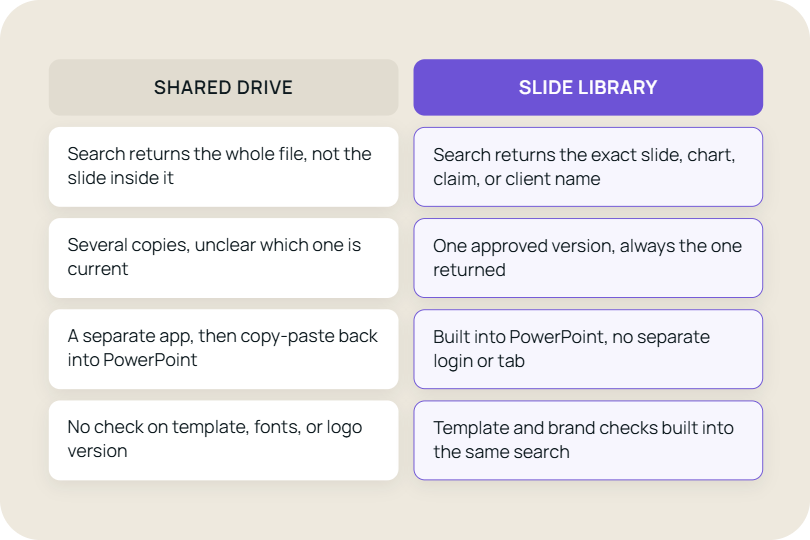
A centralized slide library, searchable at the slide level from inside PowerPoint, removes the version ambiguity entirely. Reps pull slides from one source. That source is updated by marketing or sales ops. What goes into the final deck is what the company actually approved. How TeamSlide connects to SharePoint and OneDrive
2. Personalization and accuracy are not in conflict, but most teams treat them as if they are
There is a widely held belief in enterprise sales teams that deck personalization requires reps to build freely, which means pulling from wherever they can find content. The logic runs that if you lock down the slide library too tightly, reps cannot tailor to the buyer. This is a false trade-off.
The actual problem is that most teams have never separated the question of which slides are approved from the question of how those slides can be adapted. Approved does not mean static. A case study slide can have a fixed structure and approved data points while still allowing a rep to swap the industry, adjust the headline, or reorder the narrative to match the buyer's context.
The buyer side of this equation is equally clear. McKinsey research shows 71% of buyers expect personalized interactions, and 76% report frustration when they do not receive them. The demand for personalization is not softening. What is failing is the infrastructure behind it. Reps who want to personalize but have no governed content source to draw from are forced to choose between sending a generic deck and sending an accurate one, or building a personalized one that may contain outdated data. None of these options is good.
When reps do not have access to a governed library of adaptable slides, they personalize by rebuilding. They take an old deck, strip out what does not fit, search three folders for a more relevant case study, paste in a competitor comparison from a version they remember seeing, and send the result. The output looks personalized. The data inside it may be 14 months out of date.
Deck personalization done properly is a governed process, not a free-form one. The rep's creativity operates inside accurate content, not around it. This is the operational gap slide governance platforms are meant to solve.
3. The individual rep carries the risk that the organization created
When a deal stalls after a deck inconsistency, the instinct is to treat it as a rep-level failure. They sent the wrong version. They did not check. They should have known better. This framing is not just inaccurate. It prevents the actual fix.
The rep operating in a fragmented content environment is not making a careless choice. They are making a rational one under time pressure. They have a deck due, they have a folder they have used before, and they do not have a fast, searchable, trusted source of current slides. The problem is structural, not behavioral.
The human cost of this is also real but rarely discussed. Reps in late-stage deals are already managing pricing negotiations, legal reviews, stakeholder mapping, and internal forecasting conversations. When they also carry the cognitive load of figuring out whether any given slide is current and approved, they are operating with a fraction of the attention the deal actually requires. Small errors compound. Confidence in the deck erodes. That erosion surfaces in how they present, not just in what they present.
The commercial case for removing this burden is documented. The Forrester State of Sales Enablement Report 2025 finds that companies with a strategic sales enablement approach increase their close rate by an average of 49%. Organizations that specifically invest in standardized pitch deck components report 26% higher ROI than those with general enablement programs. The implication is not subtle: the deck is not a supporting asset. It is a primary driver of whether the deal closes.
Fixing this at the individual level through training or checklists does not scale. The only durable fix is removing the ambiguity from the source. When there is one place to find slides and that place is accurate, the rep's energy goes back into the deal.
4. What controlled deck personalization actually looks like in practice
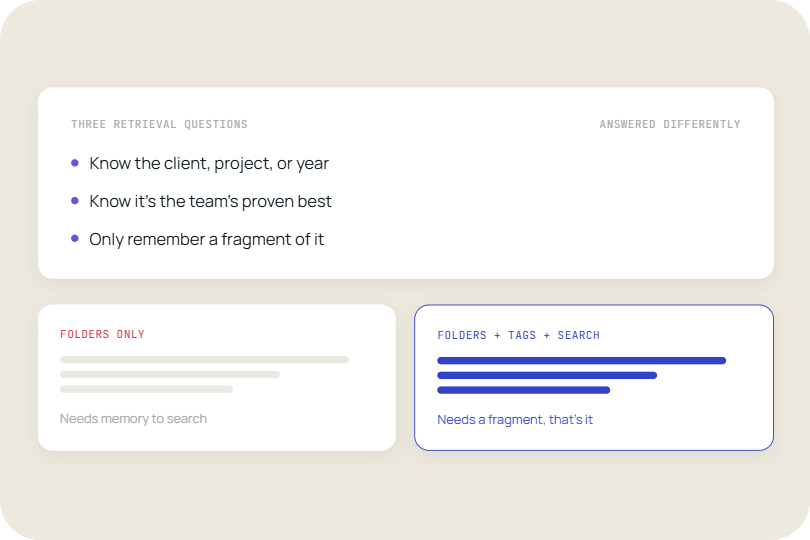
Personalization that does not introduce risk follows a specific pattern. The rep starts from a governed base, not a blank slide or a copied-over file. They select slides from a library where each asset is tagged, versioned, and approved for use. They adapt where the brief allows. They send a deck that is both on-message and on-brand, because the underlying content was built to support both.
The practical difference is visible at the buyer end. A deck assembled from a governed library has internal consistency: the same tone, the same terminology, the same data points referenced across slides. A deck assembled from scattered files has micro-inconsistencies that careful reviewers notice, even if they cannot name them. The sourcing decision the rep made in twenty minutes produces a perception the buyer carries into the final negotiation.
The operational benefit is measurable too. Boston Consulting Group research (2024) finds that B2B companies implementing systematic pitch materials reduce customer-specific presentation creation time by 37% and achieve a 23% improvement in proposal-stage conversion rates. The time savings are real, but the conversion improvement is the number that matters. A rep spending less time rebuilding slides is a rep spending more time on the deal. That attention compounds across every active opportunity in the pipeline.
This is the operating model TeamSlide is built to support. Reps work from a governed slide library, pull approved content directly inside PowerPoint, and adapt within boundaries that marketing and sales ops control. Personalization happens. The content risk does not.
The point is not that personalization is dangerous. It is that personalization without content governance is where the risk lives. The two are compatible. Most teams just have not built the infrastructure to make them so.
The underlying shift that changes the problem permanently
Content sprawl in enterprise sales is not a people problem dressed up as a process problem. It is an infrastructure problem that manifests as a people problem. Teams do not lack discipline. They lack a content architecture that makes the right choice the easy choice.
The shift that changes the outcome is not from decentralized to centralized control. It is from content stored in locations to content made findable and trustworthy at the point of use. That is a different design problem, and it has a different solution.
The warning signs usually appear before deals are lost
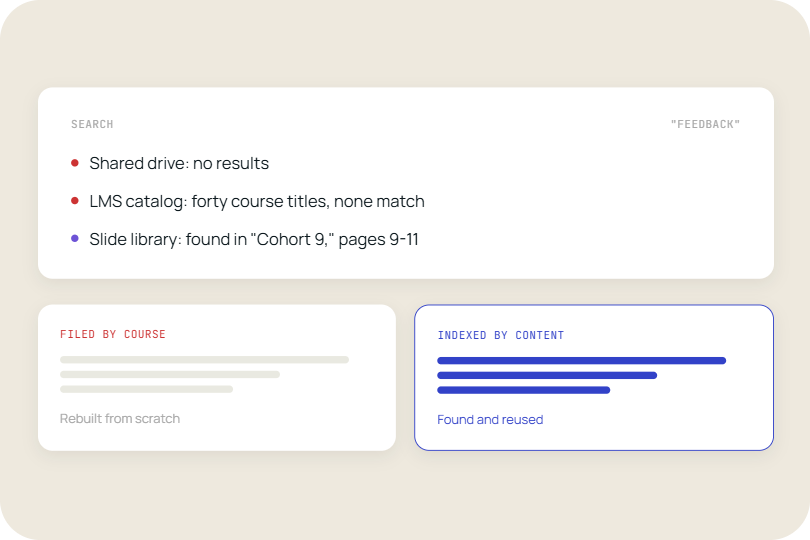
- Reps regularly rebuild slides from scratch because they cannot locate the approved version quickly.
- Decks submitted to the same account at different stages of the sales cycle contradict each other on pricing, features, or case studies.
- Marketing updates a slide template and has no reliable way to confirm that updated version reaches all active deals.
- New reps onboarding spend their first weeks building their own slide sets instead of learning the product and the market.
- Post-mortems on lost deals cite buyer confusion or perception of internal disorganization.
- Sales ops cannot audit what slide content went to which accounts without manually reviewing individual rep folders.
Every week these conditions persist without a structural fix is a week where the content risk is compounding across every active deal in the pipeline.
What this means for revenue operations in practice
Enterprise deals that stall in the final stage are rarely stalling on price or product fit. By late stage, those issues have either been resolved or accepted. What breaks the deal at the end is credibility. And credibility, at that point in the buying process, is almost entirely a function of whether the buyer's experience of your company is consistent across every touchpoint they have had.
The slide deck is not a minor touchpoint. It is often the document that procurement, legal, and finance review in detail. It is the artifact that represents your company when your rep is not in the room. If it contains an old pricing model, a deprecated product name, or a case study that a different team member already walked back verbally, the buyer notices. The deal does not always die immediately. But the trust required to close does.
For revenue operations and sales enablement leads, the commercial implication is concrete. A governed slide library with controlled personalization capability reduces late-stage deal risk, shortens the time reps spend on content prep, and gives marketing ops a mechanism to push updates that actually reach active deals. That is not a content management benefit. That is a revenue protection measure.
Most enterprise teams hit the same wall. Personalization scales, governance does not. That is the exact problem TeamSlide is built to solve. It sits inside PowerPoint, connects directly to SharePoint or OneDrive, and gives your team a searchable, governed slide library from day one. No migration, no restructuring, no change to how your reps already work.
FAQ
Why do enterprise deals stall in the final stage even after a strong sales process?
Late-stage deal stalls are most commonly caused by inconsistencies that surface during the buyer's final review phase. Procurement, legal, and finance teams examine decks in detail and cross-reference them against earlier communications. When a pricing slide contradicts the proposal, or a case study references an outdated capability, it introduces doubt about the vendor's operational reliability. At that point in the cycle, the buyer has already invested significant time. The stall is rarely about price or fit. It is about whether the vendor appears as controlled and credible on paper as they did in conversation.
How do outdated slides affect close rates in enterprise sales?
Outdated slides create a specific and serious problem in enterprise deals. When a late-stage deck contains slide content that conflicts with what was discussed or promised earlier, it signals to the buyer's internal reviewers that the vendor's content is not governed. This perception is difficult to recover from because it raises a broader question: if the slides are inconsistent, what else might be? The effect on close rates is hard to isolate in most sales data because it is recorded as 'buyer went with a competitor' or 'deal went cold', not 'outdated slide created credibility issue'.
What is deck personalization and why does it matter for sales teams?
Deck personalization is the practice of adapting a sales presentation to reflect the specific context, industry, use case, or stakeholder profile of a target account. It matters because generic decks perform worse in late-stage enterprise deals where multiple internal reviewers are evaluating the vendor. Personalization signals that the vendor understands the buyer's specific situation. The risk is that personalization done without content governance, meaning reps pulling from scattered sources, introduces inconsistencies that undermine the credibility the personalization was meant to build. Effective personalization operates inside approved content, not around it.
How does a slide library reduce risk in enterprise sales cycles?
A slide library reduces risk by ensuring that the content going into any rep-built deck is drawn from a single, governed, version-controlled source. When reps search for slides from inside PowerPoint and pull from a centralized library, they are using content that has been reviewed and approved by marketing or sales ops. Updates made to that library propagate immediately. There is no version drift because there is no secondary storage layer where old slides accumulate. For late-stage deals specifically, this means that the deck submitted for final review reflects the company's current approved position on pricing, product, and case studies.
What is the difference between a slide library and a shared folder?
A shared folder stores files. A slide library stores slides as individual, searchable, tagged assets. In a shared folder, a rep searching for a case study opens multiple decks, scans through them, and manually copies what they need. Version control depends on whoever last updated the file remembering to rename it. In a slide library, the rep searches by keyword, filters by industry or use case, and pulls the approved slide directly into their deck. The library owner controls what is current. The rep does not need to make that judgment call under deadline pressure.



More from our blog
Discover insights and strategies for better presentations