How can sales reps build client-ready presentations in minutes instead of hours?
TL;DR
- Reps routinely rebuild presentations that already exist somewhere in the company, because nobody can find the approved version fast enough to reuse it.
- The Forrester Activity Study, which tracked 3,031 reps across industries, found that the average rep loses nearly two full working days a week to administrative tasks, and content hunting is one of the largest single contributors.
- SPOTIO's 2026 State of Field Sales survey found that 84% of sales executives name content search and utilization as their single biggest productivity gap.
- A synced, searchable slide library removes the guesswork about which deck, pricing slide, or logo is current, and gives every rep one place to pull from instead of a dozen.
- AI slide generation built on a company's actual templates, modules, and components can turn a rough outline into a client-ready deck without a designer needing to touch it.
Sales reps aren't slow. Their process is
It's 9 p.m. before a client call and an account executive is scrolling through six folders, three group chats, and an old email thread looking for "the good version" of a case study slide. She finds one, but it has last quarter's logo and a stat that's since been updated. She rebuilds it from scratch instead, because that feels faster than tracking down who owns the correct one.
This happens on nearly every deal team, every week. The slide almost always already exists. The problem isn't that reps can't build a good deck. It's that finding, trusting, and assembling the right content takes longer than starting over.
The Forrester Activity Study makes the scale of this visible: across 3,031 reps, the average person loses nearly two full working days a week to administrative and non-selling work, much of it spent digging through disconnected content sources instead of talking to prospects. Every hour spent hunting for a slide is an hour not spent on the call that actually moves a deal forward.
Multiply that by a team of twenty reps, each losing hours to the same search-and-rebuild cycle, and the cost stops looking like a minor annoyance. It starts looking like a full-time job's worth of selling time disappearing every week, spread thin enough across the team that no single person notices it until a deadline forces the issue.
Sign 1: Every proposal starts from a blank file, or last year's
Most reps default to one of two starting points: a blank slide or whatever deck they can find fastest, regardless of how current it is. Neither is a real starting point. A blank slide means rebuilding a chart, a framework diagram, or a client logo grid that a colleague already built last month. An old deck means inheriting outdated pricing, a retired case study, or a value prop the product team quietly walked back.
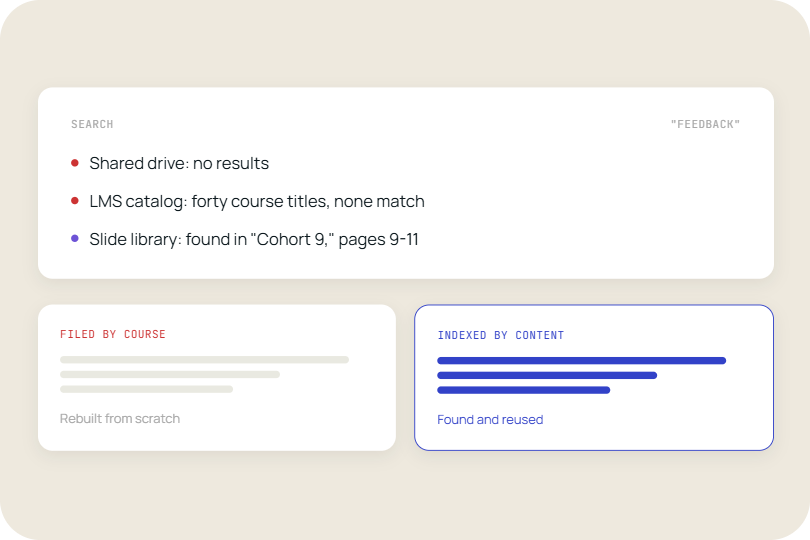
Sales enablement teams spend real budget producing case studies, ROI calculators, and framework slides, and most of it goes unused simply because reps can't find it inside their own workflow. The content exists. It's just scattered across a shared drive, a marketing wiki, and forty email attachments, none of which are searchable by what's actually on the slide.
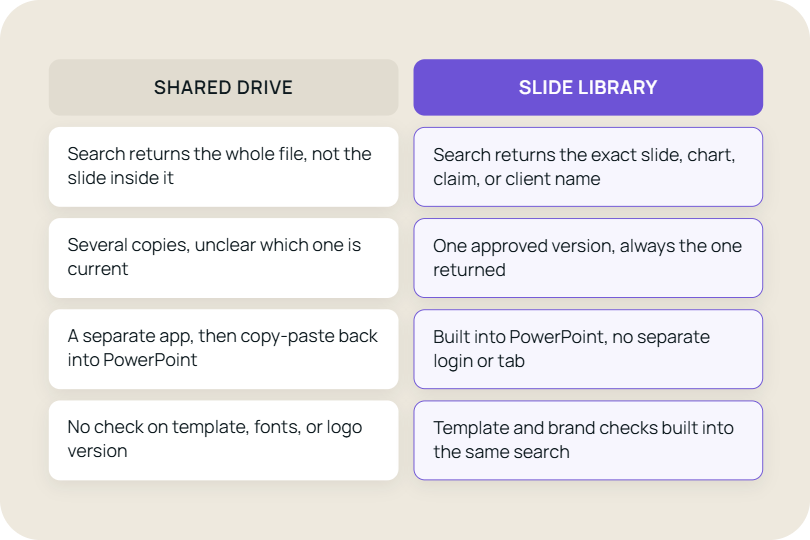
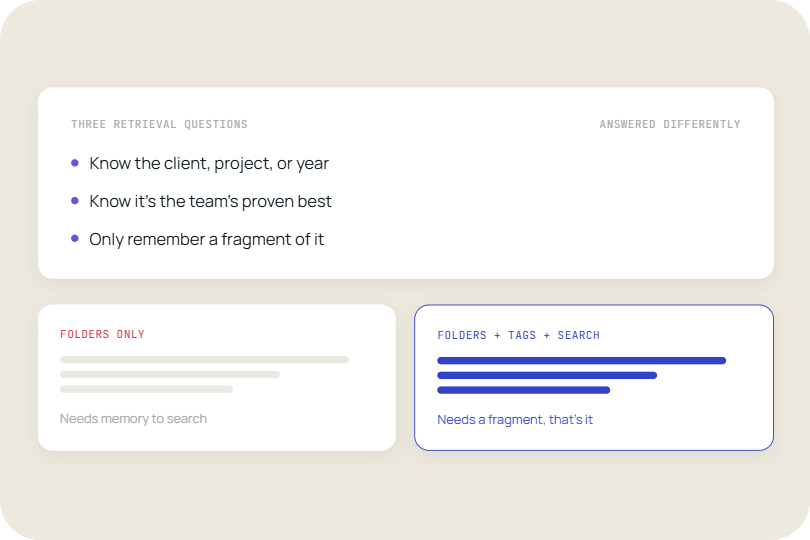
The fix isn't asking reps to be more organized. It's giving them a single place where every approved slide is searchable by its actual content, tables, chart labels, and speaker notes included, so the right asset surfaces in seconds instead of a folder-by-folder search. That's the difference between a slide library built for presentation management and a shared drive with good intentions.
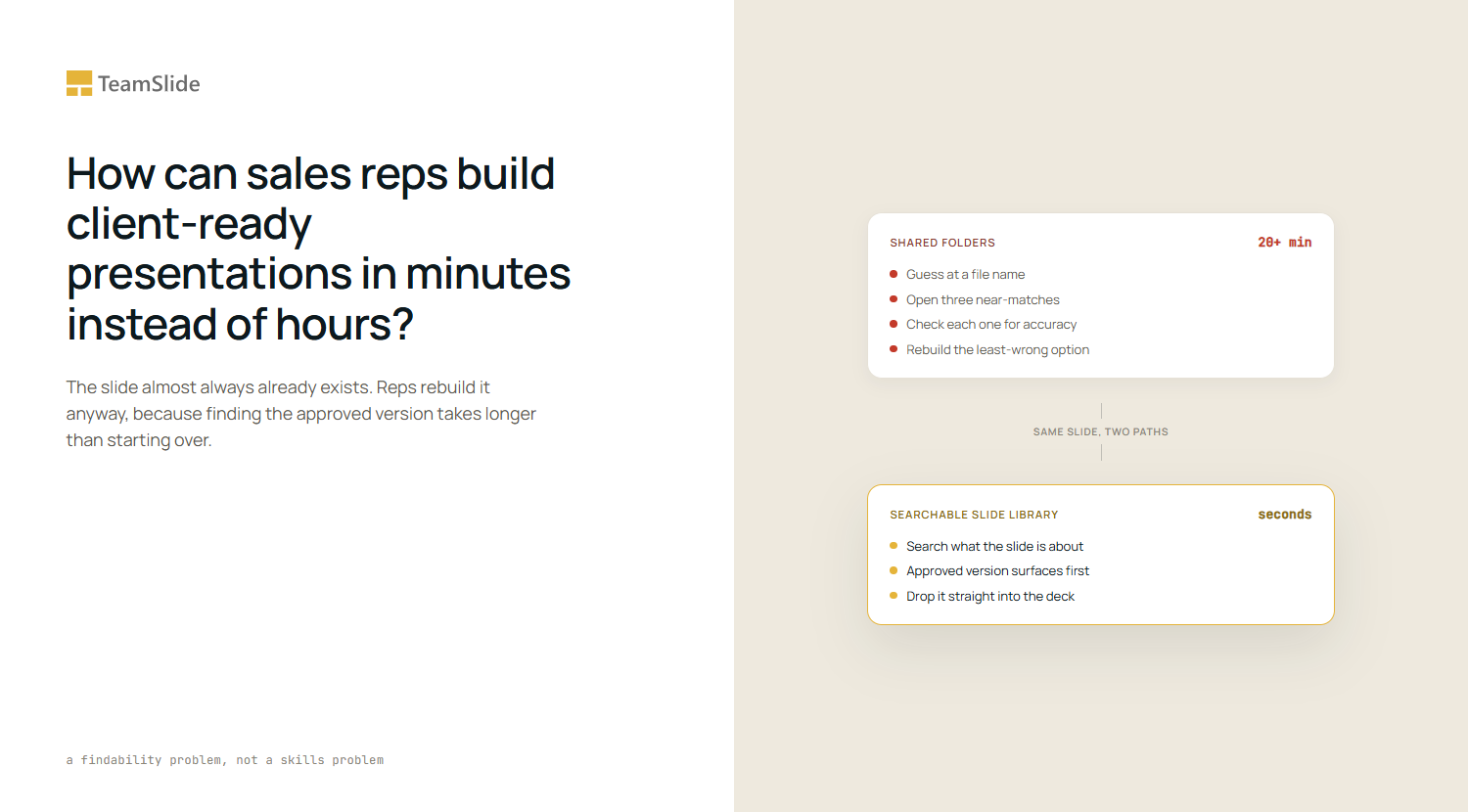
Compare the two paths side by side. In a shared folder, a rep types a guess at a file name, opens three near-matches, and manually checks each one for accuracy before picking the least-wrong option. In a searchable library, the rep types what the slide is actually about, sees the approved version first, and drops it straight into the deck. The second path takes seconds. The first regularly takes twenty minutes or more, before any editing even begins.
Sign 2: The best slide lives on someone else's laptop
Ask five reps on the same team where the strongest competitive comparison slide is, and expect five different answers, or a shrug. High-performing content tends to live wherever the rep who built it last saved it: a personal OneDrive folder, a Slack thread, a laptop that left the company with the person who made it. Nobody else on the team benefits from it, even though it might be the single best asset in the org.
This is the exact gap SPOTIO's 2026 field sales research surfaces: 84% of sales executives point to content search and utilization, not content creation, as their biggest productivity problem. Teams don't have a shortage of good slides. They have a shortage of ways to find the good slides that already exist, especially the ones a single rep built for a single deal and never resurfaced.
A searchable library with tagging and permissioning solves this by making every approved slide visible to the whole team the moment it's added, not just to the person who created it. Pair that with instant PowerPoint search inside the add-in itself, and a rep never has to leave the deck they're building to go look for the piece they need.
This matters most for newer reps, who don't yet know which colleague built the best version of a given slide, let alone where to find it. A shared library flattens that knowledge gap on day one instead of after six months of asking around the desk.
Sign 3: Reps quietly rebuild what marketing already made
Marketing and sales enablement teams invest real time into pixel-perfect chart templates, framework slides, and stat callouts. Reps use a fraction of them, not because the slides are bad, but because reps don't know they exist or can't find them under deadline. So they rebuild a rough version themselves, in a font that's close enough, with a layout that's close enough, and a brand that's suddenly a little less consistent.
This is where a design-system-driven slide generator earns its place, separate from the library itself. TeamSlide's AI slide generation works from three building blocks instead of a fixed template list: full templates for when the brief calls for exactly that, modules such as a chart-with-narrative or a framework diagram that can be resized and recombined, and smaller components like icons, dividers, and callouts placed with precision. A rep types a rough outline and gets a slide built from the firm's actual fonts, grid, and framework style, not a generic AI layout that reads as off-brand the moment it lands in front of a client.
That distinction matters more than it sounds. A slide that looks like it came from a different firm reads as junior, and that's a real cost in a competitive deal, not a cosmetic one. Structuring generation around templates, modules, and components, rather than one fixed layout list, also means the output can keep pace as a deal evolves, resizing a framework module or swapping a component instead of forcing a rep to start over when the story changes mid-deal.
Sign 4: Brand and pricing mistakes slip through under deadline pressure
The riskiest moment in any proposal isn't the first draft. It's the 11 p.m. edit before a morning client call, when a rep is nudging text boxes, swapping in a logo from memory, and hoping the pricing table is still accurate. Small errors here (a retired product name, an old percentage, a font that doesn't match the rest of the deck) are exactly the kind of thing a client notices even when they don't say anything.
Version control closes most of this gap on its own. When a slide is updated in the source system, a library flagging older copies means a rep is never one click away from presenting content that's already been superseded. That single change (always pulling from what's current, not what's saved locally) removes the majority of brand and accuracy mistakes before they ever reach a client's inbox.
The structural shift: this is a findability problem, not a skills problem
None of this comes down to reps being careless or under-trained. It comes down to content that exists in more places than anyone can track, with no single place that's understood to be correct. A rep isn't failing when they rebuild a slide that already exists. They're responding rationally to a system where finding the real version takes longer than starting over.
The fix isn't more training or another folder structure with better naming conventions. It's a single source of truth that every rep, on every deal, pulls from by default, where searching is faster than rebuilding and the newest version is always the one that shows up. Once that's true, speed stops being a discipline problem and becomes a byproduct of the system itself.
When the transition becomes necessary
A few signs it's time to move off shared folders and email attachments for good:
- Reps still message each other asking for "the latest version" of a deck or slide.
- More than one version of the same case study or pricing slide is circulating on the team.
- A deal stalls waiting on a redesign that no one is clearly responsible for.
- New reps take weeks, not days, to figure out where the good content actually lives.
- A slide shown to a client still carries an outdated logo, name, or number.
- Nobody can say with confidence which folder is the real one.
If two or more of these sound familiar, the gap isn't a training issue. It's a structural one, and it gets more expensive with every rep added to the team.
Building presentations that keep pace with the deal
The fastest sales teams aren't the ones with the most content. They're the ones where finding and assembling the right content takes less time than a coffee break. That comes down to two things working together: a searchable library that surfaces the approved slide instantly, and generation tools that build new slides in the company's own visual language when nothing existing quite fits.
Neither replaces good sales instincts. What both do is remove the hours a rep currently spends on formatting and searching, hours that come directly out of time that could go toward the client conversation itself. For a team running a full pipeline, that adds up to entire selling days recovered every month, not just a faster Tuesday night before one pitch.
Getting there doesn't require a new content strategy. It requires making the content that already exists actually findable, and making new content look like it belongs the moment it's generated.
Ready to see how a searchable slide library and AI-assisted slide generation can cut proposal build time from hours to minutes? Schedule a TeamSlide demo
FAQ
Is it worth building a slide library instead of just using PowerPoint's file search?
PowerPoint and file explorer search only match file names, not what's actually on a slide. A dedicated slide library indexes the content inside each slide, tables, chart labels, and speaker notes included, so a rep searching "healthcare case study" or "Q3 pricing" finds the right asset even if the file itself is named something unrelated. That difference alone accounts for most of the time saved.
How do sales reps keep proposals on-brand under deadline pressure?
The most reliable way is removing manual judgment calls from the process. When every slide a rep pulls comes from a version-controlled library, and every new slide is generated from the company's actual templates and fonts, there's no moment where a rep has to guess whether a logo or layout is current. Automated slide checks can also catch off-brand formatting before it reaches a client.
What's the difference between a slide library and an AI slide generator?
A slide library is a searchable home for slides that already exist and have been approved. An AI slide generator builds new slides from a rough outline or notes, using the company's templates, modules, and components so the output matches existing decks. Most sales teams need both: the library for reuse, and generation for the gaps the library doesn't cover.
Do companies still need a design team if reps can generate their own slides?
Yes, though the role shifts. Design teams move from building one-off slides on request to maintaining the templates, modules, and brand rules that generation tools and the library both draw from. That work has more leverage, since one well-built template can produce hundreds of on-brand slides instead of one.
How long does it take to set up a searchable slide library?
Most of the setup time goes into connecting existing content sources, like SharePoint, OneDrive, or Box, rather than building anything from scratch. Once connected, a library can index and tag existing decks automatically, which means teams are usually searching their full slide history within days, not months.



More from our blog
Discover insights and strategies for better presentations