Why Reps Ignore Your Enablement Library

TL;DR
- 65% of company content goes unused by sales teams, not because reps are lazy, but because finding the right asset takes longer than rebuilding it from scratch.
- Sales reps recreate content that already exists 40% of the time because they cannot find it or do not trust it is current.
- Enablement libraries fail because they are built around storage logic, not workflow logic: assets live where marketing puts them, not where reps need them.
- PDFs lock insights inside a file format that cannot be updated, reused, or tracked. Slide-level assets in a connected library can be.
- Workflow interruption is the primary adoption killer: if accessing content means leaving the tool a rep is already using, most will not bother.
Your rep has a call in 20 minutes. They need the competitive comparison slide from last quarter's pitch. They search the shared drive, scroll through Slack, check the email chain from the last deal. Fifteen minutes later, they rebuilt it from scratch.
This is not a knowledge problem. It is a retrieval problem, and it plays out dozens of times a week across every sales team that has invested in enablement content. The library exists. The content is there. Reps just cannot get to it fast enough to matter.
According to research compiled by SalesSo, 84% of sales executives cite content search and utilisation as their top productivity improvement area. The problem is well-understood at the top. It keeps not getting fixed at the bottom.
1. The library has too much content, and too little of what reps actually use
Volume is not the same as coverage. Most enablement libraries are not too small, they are too wide.
Marketing produces assets mapped to the funnel. Sales uses whatever closed the last deal. These two content sets do not overlap as much as either team assumes. The result is a library packed with one-pagers no one requested and missing the objection-handling slide that every rep rebuilds from memory.
The usage distribution is brutal: 50% of all prospect engagement comes from just 10% of enablement content. That means 90% of your library is background noise. Reps learn this quickly and stop looking.
A slide library fixes this by surfacing what gets used, not just what exists. When a rep searches for 'pricing objection,' they see the slides that have appeared in closed deals, not every asset tagged with the word pricing. Usage data becomes the filter that a content audit never quite is.
2. The content arrives at the wrong moment
Sales enablement is mostly a push-based model: create content, train the team, hope it sticks. The problem is timing.
A rep who sat through an onboarding session on competitive positioning three months ago does not remember the details when an actual competitor comes up on a live call. The knowledge existed. The moment of need is now. The two rarely connect.
According to Flowla's 2025 Enablement Benchmark Report, only 22.6% of teams deliver just-in-time guidance today. The rest are still running scheduled training cycles and hoping content reaches reps at the right moment.
A searchable slide library directly inside PowerPoint changes the timing equation. A rep does not need to remember the right slide, they need to find it in 30 seconds at the point of building the deck. That is a retrieval problem, and it is solvable without rebuilding the entire enablement programme.
3. The best insights are buried where no one looks
Every sales team has a deck that closes deals. It was built by one rep, shared informally over Slack, and never made it into the official library.
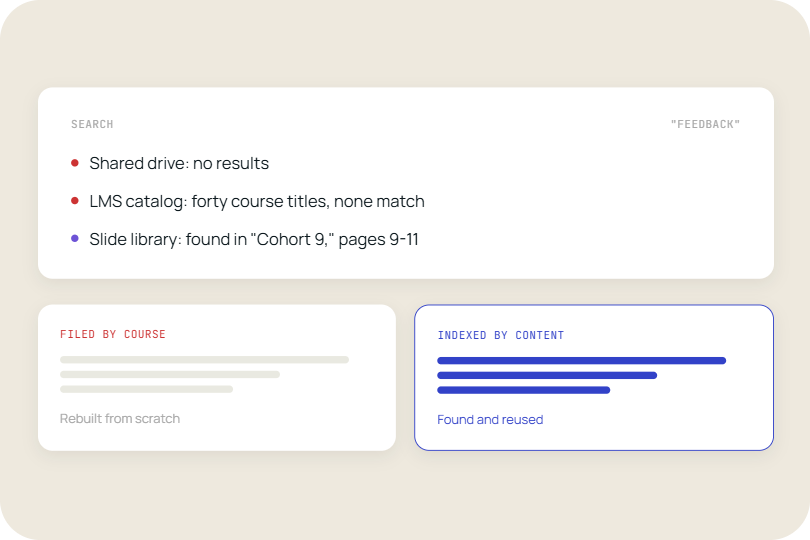
This is not a failure of process. It is a failure of discoverability. The same slide exists in a dozen different versions across a dozen different folders, and the version that actually works is sitting in a personal drive no one else can see.
Sales reps recreate content that already exists 40% of the time, according to SiftHub, because they cannot find it or do not trust it is current. The waste is not just time: every rebuilt slide is a version control problem waiting to land in a client presentation.
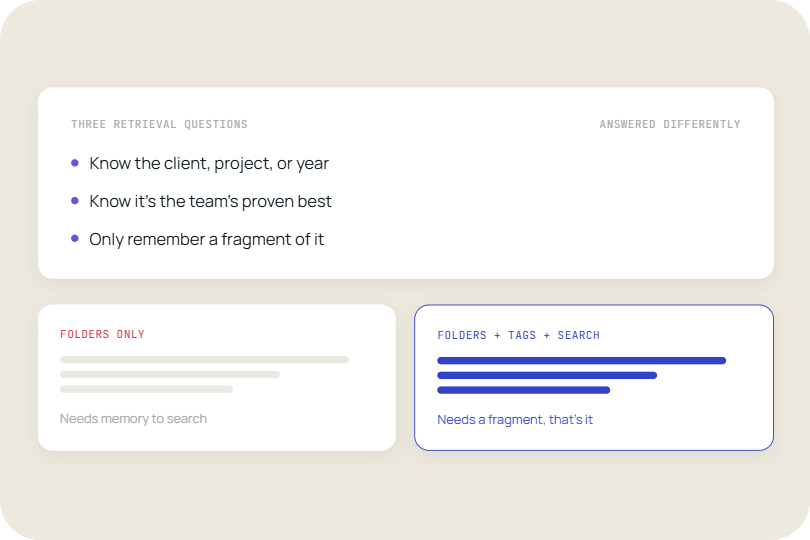
Centralising content at the slide level, rather than the document level, makes the best material findable. When the winning ROI slide from a deal last quarter is tagged, searchable, and available inside PowerPoint, it stops being buried and starts being used.
4. PDFs cannot be reused, updated, or tracked
A PDF is a dead-end format for sales content. It can be read, printed, and forwarded. It cannot be dropped into a live deck, updated without redistribution, or tracked to see whether anyone actually opened it.
Most enablement libraries are built around PDFs because they are easy to produce and easy to attach to an email. They are not easy to reuse. When a rep needs the case study slide from a two-year-old PDF whitepaper, they are copying content from a locked format into PowerPoint by hand, then spending another ten minutes reformatting it to match the current deck template.
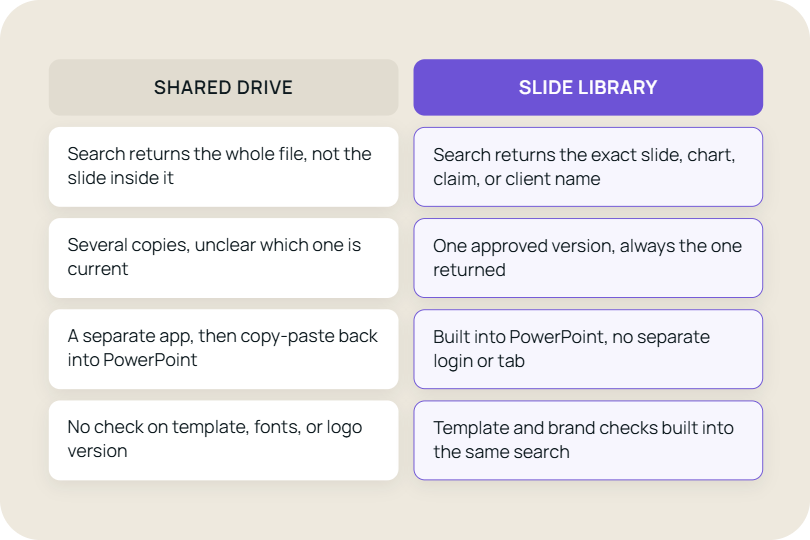
Compare this to a team whose case study content lives as individual slides in a connected library. The rep finds the slide, drags it into the deck, and the formatting is already correct because the slide was built to the current template. Organizations with centralised content libraries see 25% higher content usage rates compared to those with scattered, hard-to-search repositories.
The format is not a detail. A slide is a reusable unit. A PDF is an archive.
5. Accessing the library means leaving the workflow
Ask a rep why they do not use the enablement portal and most will give you a version of the same answer: it means opening another tab, logging in, searching, downloading, then going back to PowerPoint. That is four steps before they have done anything useful.
Workflow interruption is the adoption killer that content strategy cannot fix. You can improve tagging, redesign navigation, and run training sessions on how to use the library. None of it closes the gap between the tool the rep is already in and the tool where the content lives.
The data on tool fatigue supports this. An average of 40% of SaaS licences go unused (Productive State of SaaS 2024). Reps are not avoiding enablement platforms because the content is bad. They are avoiding them because switching context costs time they do not have during a selling day.
An enablement layer that lives inside PowerPoint, the tool where presentations are actually built, removes the context switch entirely. The content comes to the rep, not the other way around.
The structural problem underneath all five issues
Each of these five problems looks like a different failure: too much content, bad timing, buried assets, wrong formats, clunky access. They are all expressions of the same structural mismatch.
Enablement libraries are built around how content is stored and governed. Sales workflows are built around how content is found and used in a moment of need. Those two logics pull in opposite directions.
Fixing individual symptoms, better tagging, cleaner navigation, shorter PDFs, does not resolve the structural gap. The library needs to be designed from the retrieval end, not the storage end.
When the gap becomes a revenue problem
The following signs suggest the library is no longer functioning as an enablement tool:
- Reps consistently build slides from scratch that match slides already in the library.
- New starters cannot find the right deck without asking a colleague.
- The same outdated pricing slide keeps appearing in client-facing presentations.
- Marketing cannot tell which assets sales teams actually use.
- Enablement content adoption is measured by downloads, not by appearance in live decks.
- Reps describe the library as 'the place where content goes to die.
The cost of inaction is measured in duplicated effort, off-brand decks, and the deals that stall because the right slide was not in the room.
What a working enablement library actually looks like
The teams with high content adoption rates share one characteristic: they stopped treating the enablement library as a destination and started treating it as infrastructure.
The content does not live in a portal reps have to remember to visit. It lives inside the tools reps use to build decks, respond to RFPs, and prepare for calls. Search is at the slide level, not the document level. Usage data feeds back into what gets updated and what gets retired. Version control happens at the source.
The operational consequence is concrete: fewer off-brand decks in client meetings, less time spent on content searches during selling hours, and a library that gets more useful the more it is used rather than less.
TeamSlide is built around this retrieval-first model. Instead of asking reps to switch platforms or search another portal, it makes approved slides searchable directly inside PowerPoint while connecting to systems teams already use, including SharePoint and OneDrive. The result is faster deck creation, better version control, and higher adoption of enablement content without changing how sales teams work.
FAQ
Why do sales reps not use the enablement library?
The most common reasons are that content is too hard to find, arrives at the wrong time, or requires leaving the tool the rep is already using. When searching the library takes longer than rebuilding a slide from scratch, most reps choose to rebuild. Research shows that 84% of sales executives cite content search and utilisation as their top productivity improvement area, which confirms this is a retrieval problem rather than a motivation problem.
What percentage of sales enablement content goes unused?
Industry research consistently puts the figure at 65% of company content going unused by sales teams. A separate measure shows that 50% of all prospect engagement comes from just 10% of enablement content, meaning the majority of the library has near-zero impact on active selling. Sales reps also recreate content that already exists 40% of the time, because they cannot find it or do not trust it is current.
What is the difference between a slide library and a shared folder?
A shared folder stores documents. A slide library makes individual slides searchable, trackable, and reusable inside PowerPoint. With a shared folder, a rep must open a file, find the right slide, copy it, and reformat it to match the current deck. With a slide library like TeamSlide, the rep searches by topic inside PowerPoint, selects the slide, and it is inserted with formatting already applied. Usage data is also tracked at the slide level, not the file level, so content managers can see what actually gets used in live decks.
How do slide libraries help sales teams stay on-brand?
A slide library with a single source of truth means every rep pulls from the same set of approved, current slides. When a template changes or a pricing figure is updated, the change is made once in the library and is immediately available to everyone. Without this, the same slide exists in dozens of slightly different versions across personal drives and email threads, and the outdated version reliably turns up in client presentations at the worst possible time.
Does fixing the enablement library require reps to change how they work?
It should not. Solutions that require reps to adopt a new platform or change their workflow face the same adoption barrier as the library they are trying to fix. The most effective approach is to bring the library to where reps already work. TeamSlide operates inside PowerPoint, so the search experience sits inside the tool reps are already using to build decks. There is no separate login, no context switch, and no training required to find a slide.
What should sales enablement measure to know if the library is working?
Content downloads are a poor proxy for adoption. A more accurate measure is slide-level usage: how often approved slides appear in presentations delivered to prospects and customers. Teams should also track content rebuild rate (how often reps recreate slides that already exist), time spent on content search during selling hours, and version compliance (the proportion of client-facing decks using current templates). These measures link library performance directly to rep productivity.



More from our blog
Discover insights and strategies for better presentations