

Ask an operations lead what's wrong with how their firm stores decks and most will describe volume: too many decks, too many versions, not enough hours to sort through them. That's a symptom. The mechanism underneath has a name borrowed from software: technical debt.
In software, you take a shortcut to hit a deadline and pay for it later, usually with interest. Ward Cunningham used the metaphor of financial debt to describe what happens when a team ships something workable now instead of something well-structured, knowing the difference will have to be settled eventually.
Professional-services firms end up doing something similar with their content. Every deck, proposal or case study put together in a hurry and filed under the client's name is a small loan against future time. No storage report will show it. You find out the next time someone needs that slide.
A deck built for one client isn't a liability on its own. It becomes one when it's saved in a folder named after the client instead of the indication, the industry or the argument the deck makes. The next person who needs that content has to already know which client it was for. That's the whole cost of content debt: finding things depends on someone's memory, not on metadata.
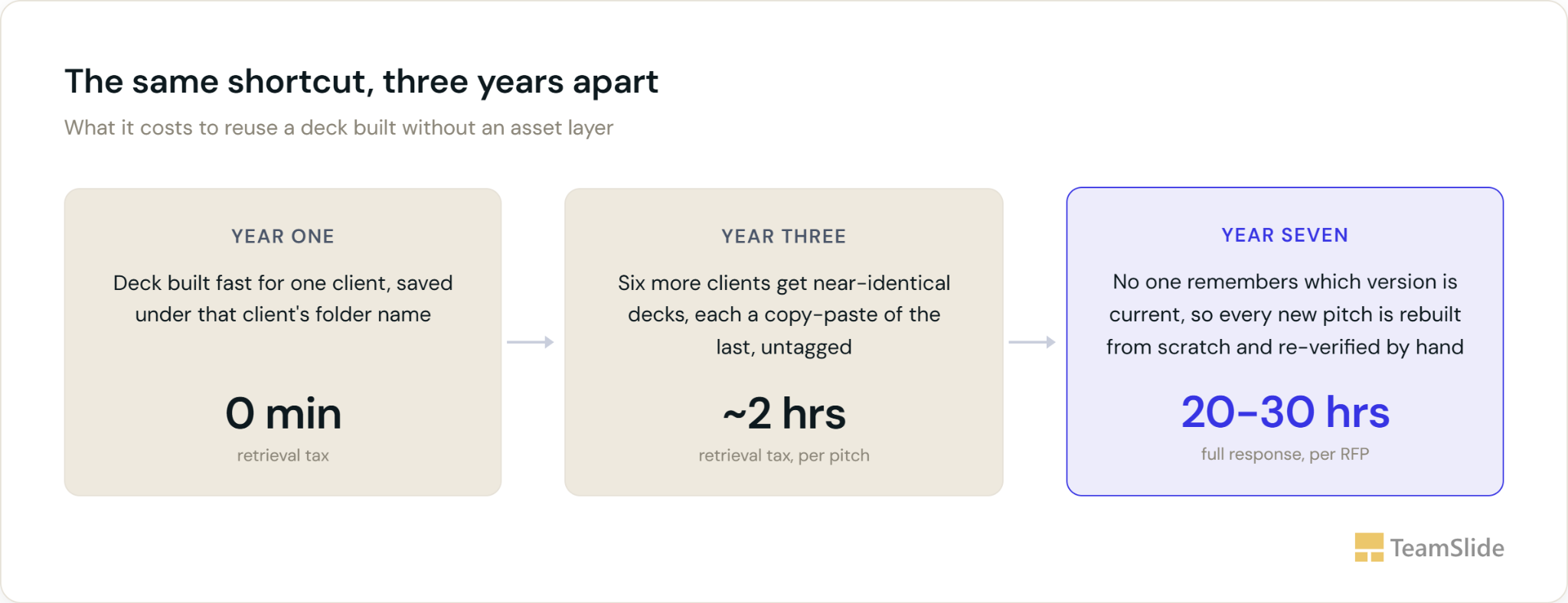
The cost is easy to see in proposal work. Bidara's compilation of RFP benchmarks puts the average response at roughly 25 hours per proposal. It also reports that teams with an active RFP content library reuse about 66% of their content, while teams without one spend 40% more time writing from scratch. Those figures are about RFP answer libraries, but the pattern holds for decks too: reuse saves time, and reuse depends on being able to find things.
Contract research organizations feel it in the bid defense: a sponsor's evaluation team asking a CRO to walk through exactly how it will run a specific protocol. Guidance on these meetings advises CROs to focus on the study at hand instead of generic capability slides. The irony is that the fastest way to sound tailored is to draw the protocol-specific detail from a library organized by indication and phase, not to write it fresh every time a new sponsor calls.
Law firms carry the same debt under the heading of knowledge management. A junior associate preparing a pitch or brief may have to search across practice-group resources, shared drives, and past matters to find the right version of a clause or case example. The good version is rarely deleted. It's just hard to find.
Financial services teams feel it in the RFP itself. Compliance requirements and multi-stakeholder review push response effort higher than in most sectors, with one vendor benchmark putting financial services at 30 to 50 hours per RFP. Much of that time goes to finding and re-checking language the firm has already written and had approved.
None of these industries has a content shortage. CROs, law firms and financial services teams all sit on years of approved material, most of it in SharePoint, Box or OneDrive, and most of it filed by client, matter or deal. That structure isn't wrong, it's just answering a different question than the one someone asks when they're staring at a blank deck.
A slide library connects to those systems as they already exist, with no migration and no folder cleanup, and it changes what a search returns. Instead of opening a client folder and scanning ten decks by eye, someone types "oncology" and gets a slide-level result: a thumbnail of every oncology slide across every client and every year, pulled from the text on the slide itself rather than from a tag someone had to apply first. Wherever a firm already tracks metadata, an indication or practice-area column in SharePoint, say, that comes through automatically and narrows the results further. Click the thumbnail and it drops straight into the deck already open in PowerPoint. Finding the one oncology slide from three years ago no longer depends on anyone remembering which client it was built for.
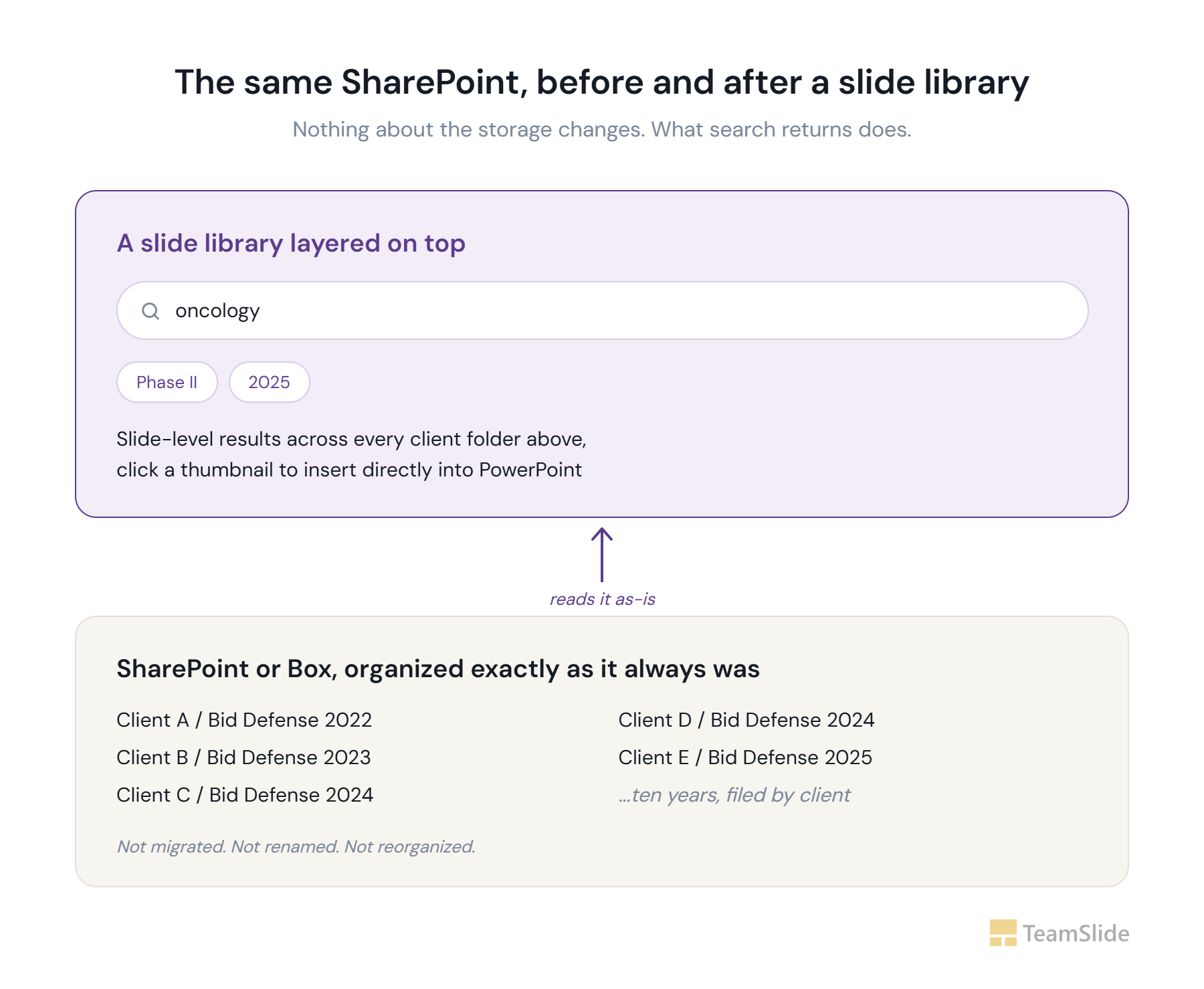
With folders, you have to hold the answer in your head before you start: which client, which year, which of three or four decks. A slide library lets you search for what the slide is about instead. That works for a new hire as well as for the partner who's been there ten years, because it doesn't rely on anyone's memory of past engagements.
A pile of decks that only works for the person who built it isn't a library. It's a memory with a search box bolted on.
1. Can a new hire find last quarter's best slide on a topic without asking a colleague where it lives?
2. When two people pull the same clause or chart, do they get the same version?
3. Does finding a past example take less time than rebuilding it from scratch would?
A no on any of the three means the debt is compounding. It will keep growing on every deck, brief and proposal until the library is organized around what the content is, not who it was first built for.
TeamSlide indexes a firm's existing decks at the slide level so a slide created three years ago for another client can surface when its subject matches what you're working on, not just when you remember its filename. Instead of rebuilding proven content from scratch, teams can find and reuse the right slide when they need it.
Content debt is the accumulated cost of reusable material, decks, clauses, and case studies that become difficult to find, verify, or reuse because they lack the structure, metadata, and version control needed to manage them over time.
Volume alone isn't debt. A well-organized library of 50,000 slides can be faster to search than a messy repository of 500. Content debt is specifically about the retrieval structure, whether content is filed by project (which only helps someone who already knows the project) or by subject and type (which helps anyone searching by topic).
Because most libraries are organized by client or matter rather than by subject, so the response team has to first guess which past engagement resembles the current one before they can even start searching. Industry benchmarking puts average RFP response time at roughly 25 hours, with financial services benchmarks running higher, around 30 to 50 hours, because compliance review adds another layer on top of the search itself.
Content reuse rate is the share of a proposal or deck built from pre-approved existing material rather than written from scratch. Vendor benchmarks treat rates below about 50 percent as a sign there's a lot of room to improve, and rates above 70 percent as a mature library.
No. A slide library works as a search layer on top of your existing system, such as SharePoint, so your files stay where they are. It indexes the text on each slide, and it can use metadata you already have, like indication or practice area, to narrow results.
Nobody needs to own it the way an engineering team owns technical debt. A slide library indexes the text on every slide, so search works without anyone retagging or renaming files in SharePoint first. Someone should still check for stale slides now and then, but that's a few minutes a week, not a restructuring project.
No, it depends on one. A slide generator still needs to draw from approved, easy-to-find source material to produce something accurate and on-brand; without an organized library underneath it, generation just produces a faster way to write the wrong thing.